
Sponsored byHotel Lobby AI- Turn two portraits into an orange duet video
BAT AI TOOLSBAT AI TOOLS
  • Tools
  • Category
  • Jobs
  • Pricing
  • PromoFREE
Free Submit
Sign In
  • Home
  • /
  • AI Chatbot
  • /
  • ChatGPT Finder
ChatGPT Finder

ChatGPT Finder

Active
Tagline:Manage all your ChatGPT creations like magic
Updated:October 22, 2026
Domain Rating:
1Domain Rating by Ahrefs
Social Media:
AI ChatbotPrompt Engineering ToolsResearch & Data AnalysisText Generation & EditingFreeChrome ExtensionBrowser ExtensionPrivacy-FocusedZero SetupFor CreatorsFor DevelopersBulk Processing
Open Website
ChatGPT Finder
Visit Website
|
  • About
  • Pricing

What is ChatGPT Finder?

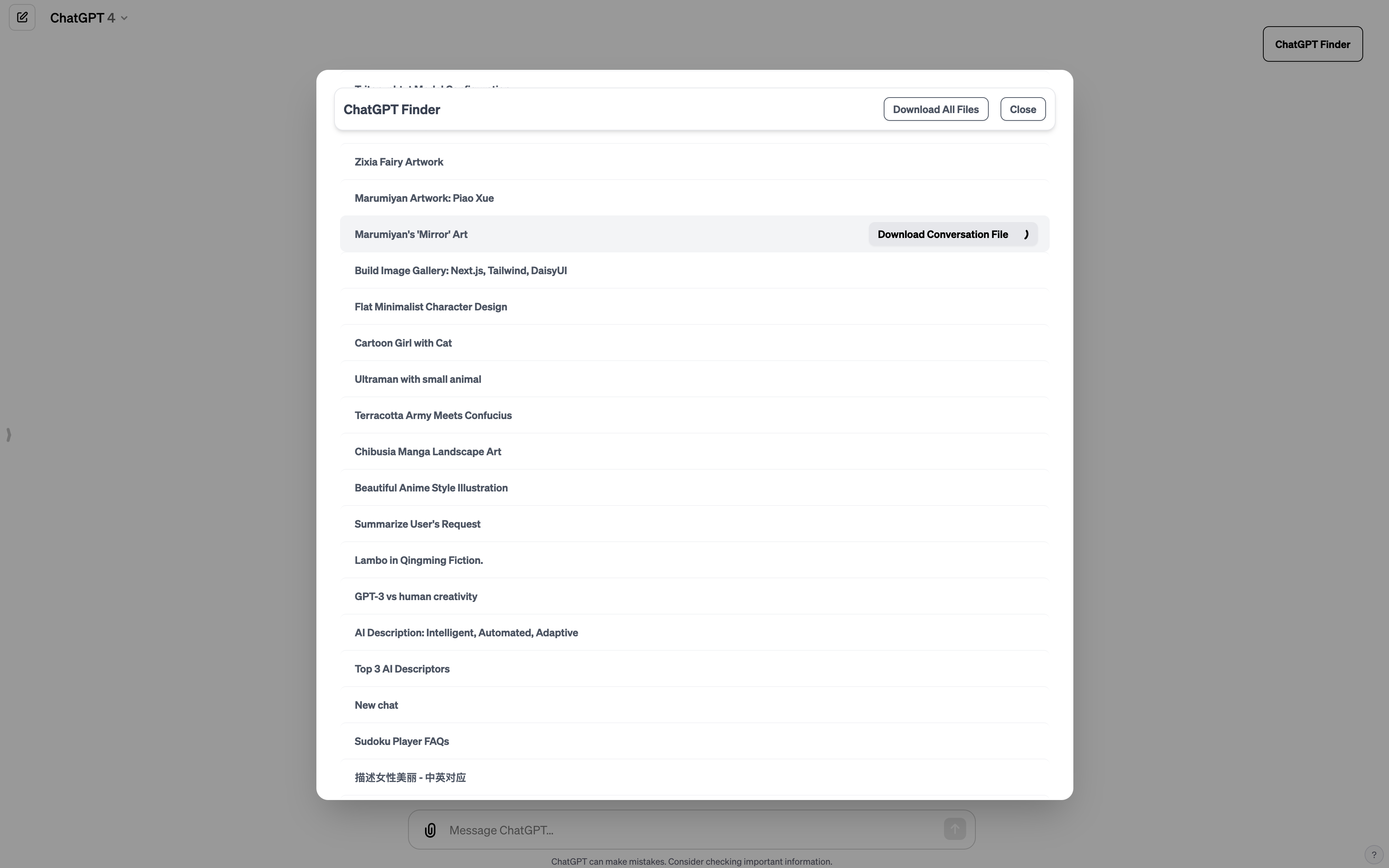
ChatGPT Finder is a browser extension tool designed to manage and export files created by ChatGPT. It allows users to view creations organized by conversation, download assets individually or in bulk, and manage DALL-E 3 prompts directly within the ChatGPT interface.
ChatGPT Finder screenshot 1
ChatGPT Finder screenshot 2

How to use ChatGPT Finder?

1. Install the ChatGPT Finder extension from Chrome Web Store or Edge Add-ons. 2. Open ChatGPT in your web browser. 3. Explore your creations organized by individual conversations. 4. Download specific files, export all creations in bulk, or copy DALL-E 3 prompts with one click.

ChatGPT Finder Core Features

01

View all creations by conversation

Explore all creations in a unified interface, including DALL-E 3 images and Code analysis tool outputs.

02

Convenient batch downloading

Download creation files by specific conversation or export all files at once with background download tasks.

03

Explore and share DALL-E 3 prompts

Manage and copy original DALL-E 3 prompts generated by ChatGPT in one place, or download all prompts.

04

Native browser integration

Works seamlessly directly inside ChatGPT on Chrome and Edge browsers without external software.

ChatGPT Finder Use Cases

Manage and download DALL-E 3 generated images from past ChatGPT conversations in bulk

Extract and copy original prompts used for image generation across multiple chats

Export code files and analysis assets produced by the ChatGPT Code interpreter

ChatGPT Finder Frequently Asked Questions

What types of files can ChatGPT Finder manage?

ChatGPT Finder manages images generated by DALL-E 3, code files generated by Code analysis tools, and other files created during your ChatGPT sessions.

Which web browsers are supported?

ChatGPT Finder is available as a browser extension for Google Chrome and Microsoft Edge.

Does ChatGPT Finder collect or store my personal data?

No. The extension operates entirely inside your local browser and interacts with ChatGPT without collecting, sending, or storing user data on external servers.

Is ChatGPT Finder free to use?

Yes, ChatGPT Finder is free to download and use from the Chrome Web Store and Microsoft Edge Add-ons store.

ChatGPT Finder Product Background & Official Links

ChatGPT Finder Support Email & Customer service contact & Refund contact etc.

ChatGPT Finder Support Email: contact@chatgptfinder.app

More Contact, visit the about us page(https://chatgptfinder.app/privacy)

ChatGPT Finder Instagram

ChatGPT Finder Instagram Link: https://www.instagram.com/chatgptfinder.app

ChatGPT Finder Pricing & Plans

Most Popular

Free

Free
Free
  • Manage all ChatGPT creations in one place
  • View creations categorized by conversation
  • Download files by conversation or all at once
  • Explore and copy DALL-E 3 prompts
  • Background download support
  • Chrome and Edge browser extension support
Subscribe & upgrade now

ChatGPT Finder Tags

FreeChrome ExtensionBrowser ExtensionPrivacy-FocusedZero SetupFor CreatorsFor DevelopersBulk ProcessingSecure DataInstant Download

Best Suited Occupations for ChatGPT Finder

Software DevelopersIndie HackersWriters & MarketersSelf-Media & InfluencersGeneral Consumers

Top Product Categories

LLMs & AI Agents

  • AI Chatbots
  • AI Agents
  • Prompt Engineering
  • AI Search Engine

Engineering & Code

  • AI Code Assistant
  • AI Code Generator
  • AI Developer Tools
  • No-Code & Low-Code

Image & Creative

  • AI Image Generator
  • AI Design Generator
  • AI Art Generator
  • Image-to-Image

Video & Animation

  • AI Video Generator
  • AI Short Video Maker
  • Digital Humans
  • AI Video Editor

Productivity & Office

  • AI Meeting Assistant
  • AI PDF Tools
  • AI Workflow
  • AI PPT Generator

Marketing & Sales

  • AI SEO Tools
  • AI Copywriting
  • AI Lead Generation
  • AI Sales Assistant

Audio & Voice

  • AI Voice Cloning
  • AI Text-to-Speech
  • AI Music Generator
  • AI Podcast Tools

Research & Data

  • AI Research Tools
  • AI Data Analytics
  • AI Knowledge Base
  • See All Categories >>
BAT AI TOOLS
  • Submit your AI tool
  • Pricing
  • Partnership
  • Feedback
  • About
  • A2A Compatible
WeChat QR
Scan QR code with WeChat
hi@bataitools.comClick icon to auto-copy email
English简体中文繁體中文EspañolالعربيةBahasa IndonesiaPortuguêsFrançais日本語РусскийDeutsch한국어TürkçeTiếng ViệtItalianoNederlandsPolskiไทยहिन्दीУкраїнськаفارسیবাংলাاردوSvenskaNorskDanskSuomiעברית

Copyright © 1970 BAT AI TOOLS. All Rights Reserved.

·Partnership·Privacy Policy·Terms of Service·Refund Policy