BAT AI TOOLSBAT AI TOOLS
  • Tools
  • Category
  • Submit
  • Partnership
Sign In
  • Home
  • /
  • Daily Life
  • /
  • Cookup.AI
Cookup.AI

Cookup.AI

Active
Tagline:Your personal AI Assistant with built-in memory!
Updated:-
Social Media:
Daily LifeAI AssistantAI ChatbotFreemiumWeb AppFree
Open Website
Cookup.AI
Visit Website
Promote this product|Update this product
  • About
  • Pricing

What is Cookup.AI?

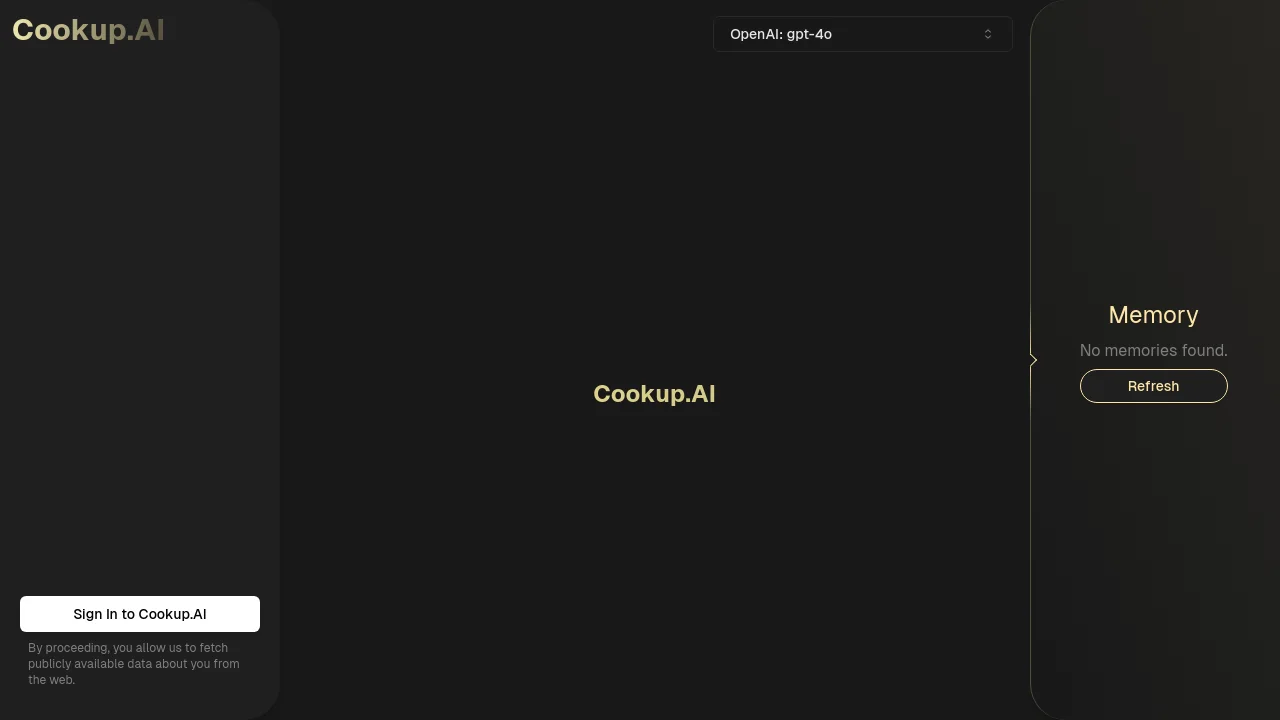
Cookup.AI is a personal AI assistant that combines chat with a built-in memory panel. Pick from models such as OpenAI GPT-4o and chat in a sidebar layout where stored memories appear alongside the conversation. Sign in with Google to start; the site notes it may fetch publicly available data about you from the web to personalize responses.

How to use Cookup.AI?

Open cookup.ai, click Sign In to Cookup.AI, and authenticate with Google. Choose an AI model from the selector (default OpenAI GPT-4o), then start chatting. View or refresh stored memories in the Memory panel on the right.

Cookup.AI Core Features

01

Built-in memory panel

A dedicated Memory sidebar stores details from your chats—such as location, food preferences, and plans—and lets you refresh the list at any time.

02

Multi-model chat

Switch between AI models from the header selector, including OpenAI GPT-4o, GPT-4 Turbo, GPT-4o-mini, plus models from DeepSeek, Groq, and Together.ai.

03

Google sign-in

Sign in with Google OAuth to access your assistant. The sign-in flow notes that Cookup.AI may fetch publicly available web data about you for personalization.

04

Conversation sidebar

Chat history and threads live in a left sidebar so you can move between conversations while the memory panel stays visible.

Cookup.AI Use Cases

Get restaurant or activity suggestions that match stored preferences and location

Continue multi-session chats without re-explaining your background each time

Pick the right model—GPT-4o for reasoning or lighter models for quick replies

Review and refresh what the assistant remembers about you in the Memory panel

Cookup.AI Frequently Asked Questions

What is Cookup.AI?

Cookup.AI is a personal AI assistant with built-in memory. The site describes it as helping you chat with AI models while remembering preferences and context across conversations.

Which AI models can I use?

The model selector includes OpenAI GPT-4o (default), GPT-4 Turbo, GPT-4o-mini, and additional models from providers such as DeepSeek, Groq, and Together.ai.

How does the memory feature work?

A Memory panel on the right shows stored details from your chats. You can refresh the list to update what the assistant remembers about you.

How do I sign in?

Click Sign In to Cookup.AI on the homepage and authenticate with your Google account.

Cookup.AI Product Background & Official Links

Cookup.AI Support Email & Customer service contact & Refund contact etc.

Cookup.AI Support Email: admin@trycookup.app

More Contact, visit the about us page(https://cookup.ai/)

Cookup.AI Pricing & Plans

Free

Free
Free
  • Sign in with Google to use the assistant
  • Built-in memory panel
  • Access to multiple AI models including GPT-4o
Subscribe & upgrade now

Cookup.AI Tags

FreemiumWeb AppFree

Best Suited Occupations for Cookup.AI

General ConsumersProduct ManagersFreelancers

Top Product Categories

LLMs & AI Agents

  • AI Chatbots
  • AI Agents
  • Prompt Engineering
  • AI Search Engine

Engineering & Code

  • AI Code Assistant
  • AI Code Generator
  • AI Developer Tools
  • No-Code & Low-Code

Image & Creative

  • AI Image Generator
  • AI Design Generator
  • AI Art Generator
  • Image-to-Image

Video & Animation

  • AI Video Generator
  • AI Short Video Maker
  • Digital Humans
  • AI Video Editor

Productivity & Office

  • AI Meeting Assistant
  • AI PDF Tools
  • AI Workflow
  • AI PPT Generator

Marketing & Sales

  • AI SEO Tools
  • AI Copywriting
  • AI Lead Generation
  • AI Sales Assistant

Audio & Voice

  • AI Voice Cloning
  • AI Text-to-Speech
  • AI Music Generator
  • AI Podcast Tools

Research & Data

  • AI Research Tools
  • AI Data Analytics
  • AI Knowledge Base
  • See All Categories >>
BAT AI TOOLS
  • Submit your AI tool
  • Pricing
  • About
  • Privacy Policy
  • Terms of Service
WeChat QR
Scan QR code with WeChat
contact@bataitools.comClick icon to auto-copy email
English简体中文繁體中文EspañolالعربيةBahasa IndonesiaPortuguêsFrançais日本語РусскийDeutsch한국어TürkçeTiếng ViệtItalianoNederlandsPolskiไทยहिन्दीУкраїнськаفارسیবাংলাاردوSvenskaNorskDanskSuomiעברית

Copyright © 2026 BAT AI TOOLS. All Rights Reserved.