

Sponsored byVibecode- Build mobile and web apps with AI.
BAT AI TOOLSBAT AI TOOLS
  • Tools
  • Category
  • Jobs
  • Pricing
  • PromoFREE
Free Submit
Sign In
  • Home
  • /
  • AI Face Swap
  • /
  • DeepLiveCam
DeepLiveCam

DeepLiveCam

Active
Tagline:Real-time face swap and virtual avatars for webcams and live streams
Updated:October 22, 2026
Domain Rating:
39Domain Rating by Ahrefs
Social Media:
AI Face SwapAI Face Swap VideoAI Avatar GeneratorAI Video GeneratorDesktop AppReal-timePrivacy-FocusedOffline SupportOpen SourceWindows CompatibleMac CompatibleSubscription
Open Website
DeepLiveCam
Visit Website
|
  • About
  • Pricing

What is DeepLiveCam?

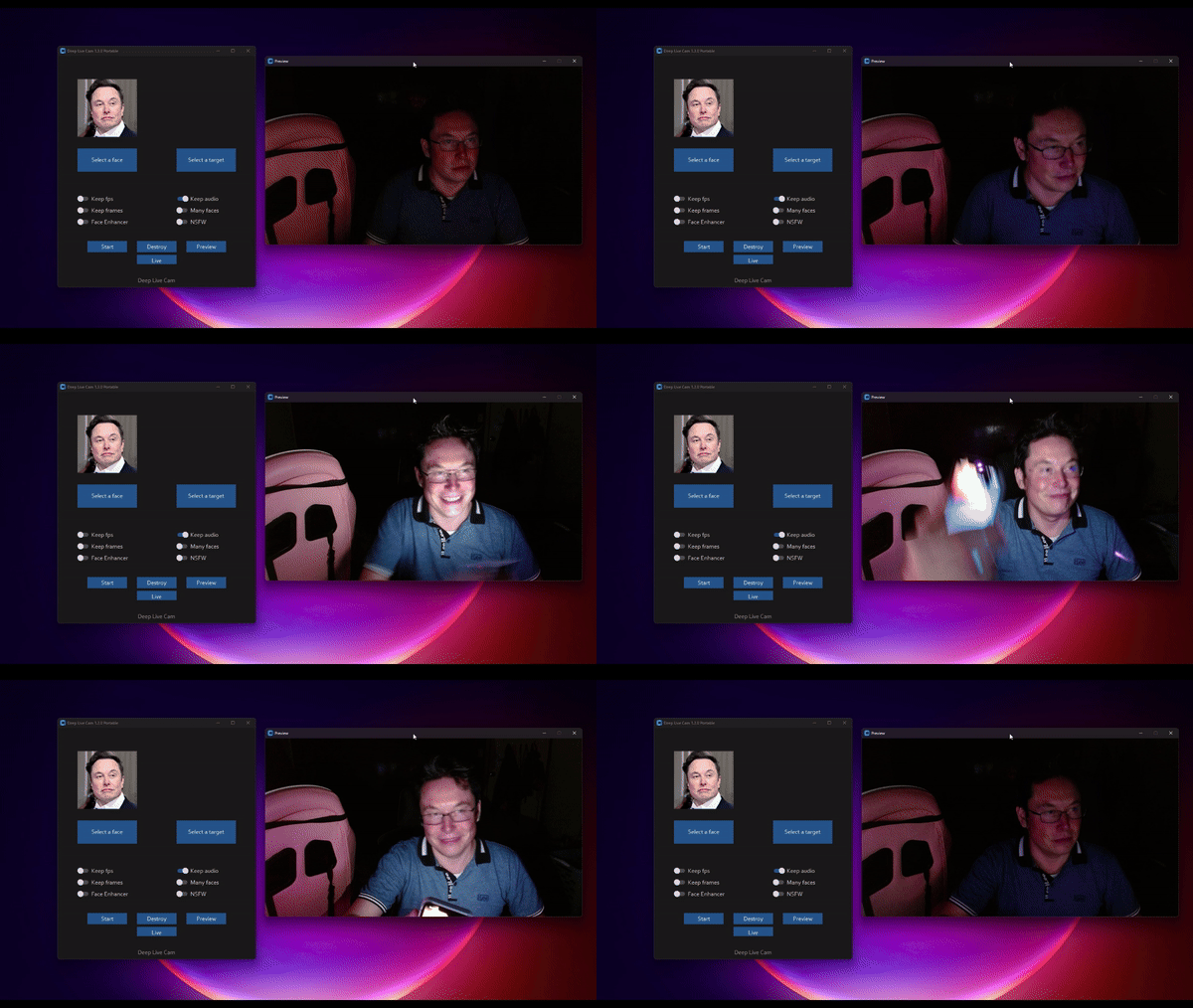
DeepLiveCam is an offline AI desktop software for real-time face swapping and virtual avatar creation with webcams. It processes video feeds locally without uploading data to the cloud, featuring live preview, OBS virtual camera integration, and GPU acceleration for Nvidia and AMD.
DeepLiveCam screenshot 1

How to use DeepLiveCam?

Unzip the release folder to C:/, run deep-live-cam.bat, select a target face image, and activate the virtual camera in OBS or streaming software.

DeepLiveCam Core Features

01

Real-Time Face Swapping

Transform webcam faces instantly during live video feeds using a single source portrait image.

02

100% Offline Processing

Runs completely on your local computer with zero data uploads to external cloud servers.

03

OBS Virtual Camera Integration

Feed transformed video into OBS Studio, MS Teams, Zoom, and streaming platforms.

04

Hardware Acceleration

Optimized execution for Nvidia GPUs via CUDA, AMD GPUs, and Apple Silicon Macs.

DeepLiveCam Use Cases

Live streaming and VTuber avatar creation

Video calls and online meetings with privacy-preserving avatars

Creative video production and digital effect prototyping

DeepLiveCam Frequently Asked Questions

How do I start and run DeepLiveCam?

Unzip the downloaded package onto your drive (e.g., C:/), double click deep-live-cam.bat, and wait 2 to 3 minutes for initialization. Then select a face image, choose your webcam, and click Live.

How do I connect DeepLiveCam to OBS or Microsoft Teams?

Install OBS Studio first. While streaming live in DeepLiveCam, click 'Virtual Camera' until it turns green. In MS Teams or OBS, select 'OBS Virtual Camera' as your video input source.

Can I still use the application after my subscription expires?

Yes, you can continue using the core offline features and installed enhancements even after your subscription period ends.

How many computers can I register DeepLiveCam on?

You can register on up to 14 computers in total, with a limit of 2 computers per day under your active subscription.

DeepLiveCam Product Background & Official Links

DeepLiveCam Support Email & Customer service contact & Refund contact etc.

DeepLiveCam Support Email: hacksider@gmail.com

More Contact, visit the about us page(https://deeplivecam.net/index.php/quickstart)

DeepLiveCam Pricing

DeepLiveCam Pricing Link: https://deeplivecam.net/index.php/plans?plan_id=0&group_id=0

DeepLiveCam Twitter

DeepLiveCam Twitter Link: https://twitter.com/DeepLiveCam

DeepLiveCam GitHub

DeepLiveCam GitHub Link: https://github.com/hacksider/Deep-Live-Cam

DeepLiveCam Pricing & Plans

GitHub Open Source

Free
Free
  • Full source code access
  • Manual installation via Python/Git
  • Community issue support
Subscribe & upgrade now

Nvidia GPU Monthly

Recurring
$22.00 / month
  • One-click batch installer for Windows
  • Optimized for CUDA 13.0 and RTX GPUs
  • Priority support with 24-48h reply
  • Register on up to 2 computers per day (max 14 total)
Subscribe & upgrade now
Most Popular

Nvidia GPU Quarterly

Recurring
$40.00 / 3 months
  • 33% discount compared to monthly
  • One-click batch installer for Windows
  • Optimized for CUDA 13.0 and RTX GPUs
  • Priority support with 24-48h reply
  • Register on up to 2 computers per day (max 14 total)
Subscribe & upgrade now

Mac Silicon Edition Monthly

Recurring
$32.00 / month
  • Optimized for Apple Silicon Macs
  • Access to Quickstart package
  • Priority support with 24-48h reply
Subscribe & upgrade now

DeepLiveCam Tags

Desktop AppReal-timePrivacy-FocusedOffline SupportOpen SourceWindows CompatibleMac CompatibleSubscriptionInstant Download

Best Suited Occupations for DeepLiveCam

Gamers & StreamersSelf-Media & InfluencersAudio & Video ProducersSoftware DevelopersGeneral Consumers

Top Product Categories

LLMs & AI Agents

  • AI Chatbots
  • AI Agents
  • Prompt Engineering
  • AI Search Engine

Engineering & Code

  • AI Code Assistant
  • AI Code Generator
  • AI Developer Tools
  • No-Code & Low-Code

Image & Creative

  • AI Image Generator
  • AI Design Generator
  • AI Art Generator
  • Image-to-Image

Video & Animation

  • AI Video Generator
  • AI Short Video Maker
  • Digital Humans
  • AI Video Editor

Productivity & Office

  • AI Meeting Assistant
  • AI PDF Tools
  • AI Workflow
  • AI PPT Generator

Marketing & Sales

  • AI SEO Tools
  • AI Copywriting
  • AI Lead Generation
  • AI Sales Assistant

Audio & Voice

  • AI Voice Cloning
  • AI Text-to-Speech
  • AI Music Generator
  • AI Podcast Tools

Research & Data

  • AI Research Tools
  • AI Data Analytics
  • AI Knowledge Base
  • See All Categories >>
BAT AI TOOLS
  • Submit your AI tool
  • Pricing
  • Partnership
  • Feedback
  • About
  • A2A Compatible
WeChat QR
Scan QR code with WeChat
hi@bataitools.comClick icon to auto-copy email
English简体中文繁體中文EspañolالعربيةBahasa IndonesiaPortuguêsFrançais日本語РусскийDeutsch한국어TürkçeTiếng ViệtItalianoNederlandsPolskiไทยहिन्दीУкраїнськаفارسیবাংলাاردوSvenskaNorskDanskSuomiעברית

Copyright © 1970 BAT AI TOOLS. All Rights Reserved.

·Partnership·Privacy Policy·Terms of Service·Refund Policy