

Sponsored byWAE - We Are Engineer- Precision Engineered Education for engineering careers
BAT AI TOOLSBAT AI TOOLS
  • Tools
  • Category
  • Jobs
  • Pricing
  • PromoFREE
Free Submit
Sign In
  • Home
  • /
  • AI Text-to-Speech / Voiceover
  • /
  • OpenAI Text To Speech WebUI
OpenAI Text To Speech WebUI

OpenAI Text To Speech WebUI

Active
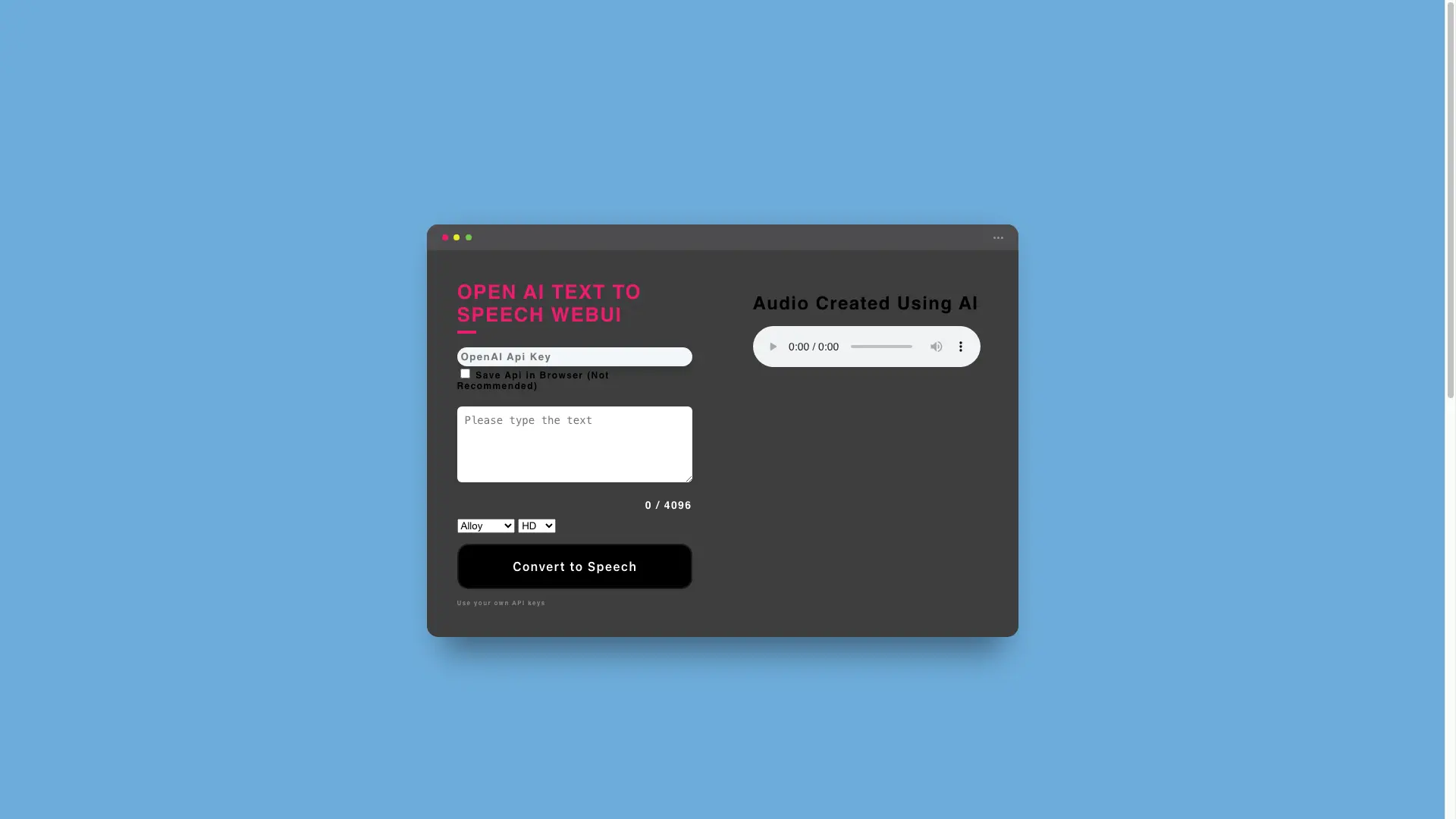
Tagline:Convert text to speech in your browser with OpenAI's TTS API
Updated:-
Social Media:
AI Text-to-Speech / VoiceoverVoice Generation & ConversionAI API InterfaceFreeWeb AppZero SetupMulti-languageHigh DefinitionFor CreatorsNo-Code
Open Website
OpenAI Text To Speech WebUI
Visit Website
|
  • About
  • Pricing

What is OpenAI Text To Speech WebUI?

A free browser-based WebUI for OpenAI's Text-to-Speech API. Paste text, pick one of six voices and a Standard or HD model, and generate natural-sounding audio in 50+ languages using your own OpenAI API key.

How to use OpenAI Text To Speech WebUI?

Open the page, enter your OpenAI API key, type or paste text up to 4096 characters, choose a voice and a model (Standard or HD), then click Convert to Speech to hear and download the audio.

OpenAI Text To Speech WebUI Core Features

01

Six OpenAI Voices

Choose from Alloy, Echo, Fable, Onyx, Nova, and Shimmer to match the tone you need.

02

Standard and HD Models

Switch between the tts-1 Standard model and the tts-1-hd High Definition model for clearer audio.

03

Up to 4,096 Characters

Generate speech from long passages in a single request, capped at 4096 characters of input text.

04

Bring Your Own API Key

Runs on your own OpenAI API key with no account or subscription required by the WebUI.

05

50+ Languages

Supports a wide range of languages including English, Arabic, Chinese, Spanish, French, Japanese, and more.

06

Zero-Setup Browser Tool

Works entirely in the browser with no install; optionally save your key locally (not recommended).

OpenAI Text To Speech WebUI Use Cases

Create voiceovers for product and marketing videos

Generate narration for presentations, audiobooks, or social posts

Practice pronunciation across 50+ languages for language learning

Turn written articles and docs into listenable audio

Prototype text-to-speech ideas before building a custom integration

OpenAI Text To Speech WebUI Frequently Asked Questions

Do I need an OpenAI API key?

Yes. This is a free frontend for OpenAI's Text-to-Speech API, so you supply your own API key on the page.

Which voices are available?

Six voices: Alloy, Echo, Fable, Onyx, Nova, and Shimmer.

Is the WebUI free to use?

Yes, the WebUI itself is free. You only pay OpenAI for the API usage tied to your own key.

How many languages are supported?

A wide range — over 50 languages including English, Spanish, French, German, Arabic, Chinese, Japanese, and more.

What is the maximum text length?

Each request accepts up to 4096 characters of text.

OpenAI Text To Speech WebUI Product Background & Official Links

OpenAI Text To Speech WebUI Support Email & Customer service contact & Refund contact etc.

OpenAI Text To Speech WebUI Support Email: support@focusgulf.com

More Contact, visit the about us page(https://focusgulf.com/aispeechwebui)

OpenAI Text To Speech WebUI Company Info

OpenAI Text To Speech WebUI Company name: Focus Gulf

OpenAI Text To Speech WebUI Developer Type: company

More about OpenAI Text To Speech WebUI, Please visit the about us page(https://focusgulf.com/aispeechwebui)

OpenAI Text To Speech WebUI Pricing & Plans

Most Popular

Free

Free
Free
  • Bring your own OpenAI API key
  • No account or subscription required
  • Usage billed by OpenAI at API rates
  • All six voices and both models included
Subscribe & upgrade now

OpenAI Text To Speech WebUI Tags

FreeWeb AppZero SetupMulti-languageHigh DefinitionFor CreatorsNo-Code

Best Suited Occupations for OpenAI Text To Speech WebUI

Audio & Video ProducersWriters & MarketersSelf-Media & InfluencersGeneral ConsumersStudents

Top Product Categories

LLMs & AI Agents

  • AI Chatbots
  • AI Agents
  • Prompt Engineering
  • AI Search Engine

Engineering & Code

  • AI Code Assistant
  • AI Code Generator
  • AI Developer Tools
  • No-Code & Low-Code

Image & Creative

  • AI Image Generator
  • AI Design Generator
  • AI Art Generator
  • Image-to-Image

Video & Animation

  • AI Video Generator
  • AI Short Video Maker
  • Digital Humans
  • AI Video Editor

Productivity & Office

  • AI Meeting Assistant
  • AI PDF Tools
  • AI Workflow
  • AI PPT Generator

Marketing & Sales

  • AI SEO Tools
  • AI Copywriting
  • AI Lead Generation
  • AI Sales Assistant

Audio & Voice

  • AI Voice Cloning
  • AI Text-to-Speech
  • AI Music Generator
  • AI Podcast Tools

Research & Data

  • AI Research Tools
  • AI Data Analytics
  • AI Knowledge Base
  • See All Categories >>
BAT AI TOOLS
  • Submit your AI tool
  • Pricing
  • Partnership
  • Feedback
  • About
WeChat QR
Scan QR code with WeChat
hi@bataitools.comClick icon to auto-copy email
English简体中文繁體中文EspañolالعربيةBahasa IndonesiaPortuguêsFrançais日本語РусскийDeutsch한국어TürkçeTiếng ViệtItalianoNederlandsPolskiไทยहिन्दीУкраїнськаفارسیবাংলাاردوSvenskaNorskDanskSuomiעברית

Copyright © 1970 BAT AI TOOLS. All Rights Reserved.

·Partnership·Privacy Policy·Terms of Service·Refund Policy