

BAT AI TOOLSBAT AI TOOLS
  • Tools
  • Category
  • Submit
  • Partnership
Sign In
  • Home
  • /
  • AI Translation
  • /
  • Document Translator
Document Translator

Document Translator

Active
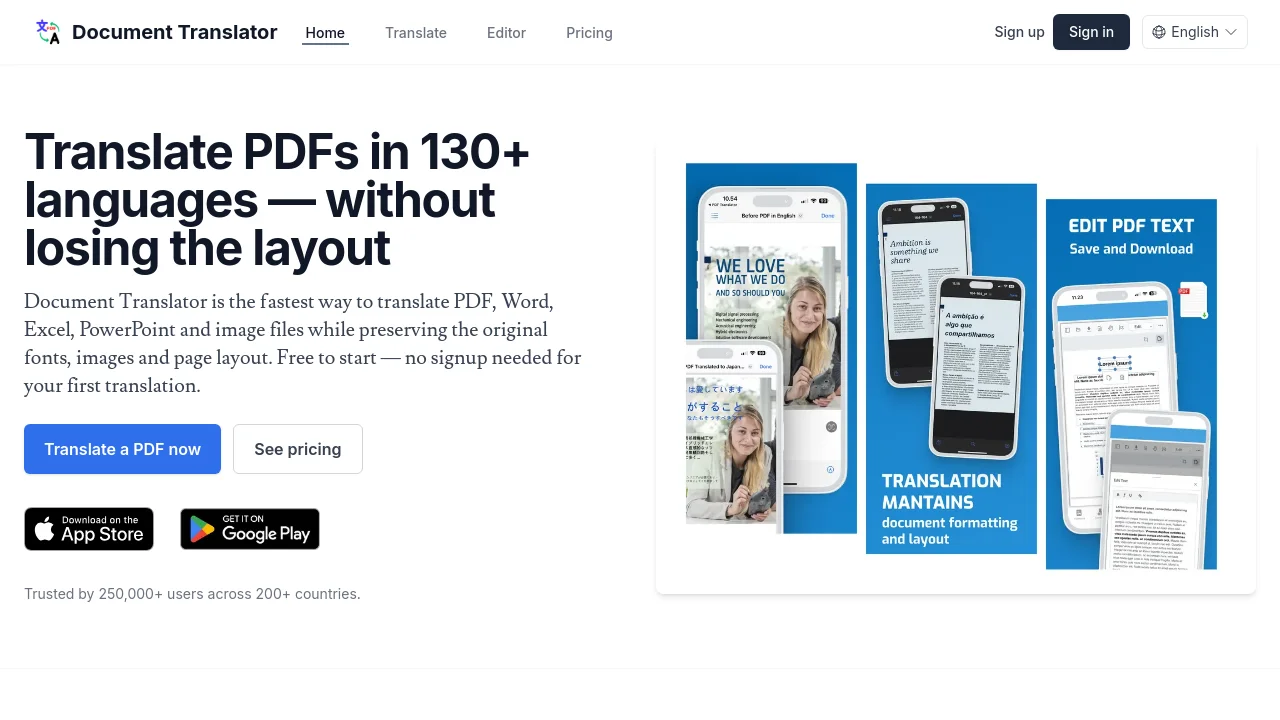
Tagline:Translate PDFs in 130+ languages — without losing the layout
Updated:-
Social Media:
AI TranslationAI PDF ToolsOffice & ProductivityMulti-languageFree TrialWeb AppMobile AppCloud-based
Open Website
Document Translator
Visit Website
Promote this product|Update this product
  • About
  • Pricing

What is Document Translator?

Document Translator translates PDF, scanned PDF, Word, Excel, PowerPoint and image files into 130+ languages while preserving the original formatting, layout, fonts and images. Free to start, with no signup required for your first translation. Trusted by 250,000+ users across 200+ countries.
Document Translator screenshot 1

How to use Document Translator?

Upload your PDF or Office document, choose the target language, and click Translate. The translated file keeps the original formatting, layout, images and fonts. Most documents are ready in under two minutes. You can also open files directly from Google Drive or OneDrive.

Document Translator Core Features

01

Layout preserved

Fonts, columns, tables, images and footnotes are reproduced in the translated PDF — the document looks identical to the source.

02

OCR for scanned PDFs

Optical character recognition makes scanned PDFs and photographed documents (JPG, PNG, HEIC) fully translatable.

03

Translate Word, Excel and PowerPoint files

Office documents are supported alongside PDFs — translate .docx, .xlsx and .pptx with formatting preserved.

04

Google Drive & OneDrive

Right-click any PDF in Google Drive or OneDrive and choose Open with Document Translator. No download needed.

05

No file or page limits

Subscribers translate documents of any size — no character cap, no page cap, no daily quota.

06

Edit & convert PDFs

Edit PDF text, convert PDF to and from JPG/PNG, scan to PDF, split and merge PDFs — all online.

Document Translator Use Cases

Translate business contracts and legal PDFs while keeping original layout

Convert scanned documents and photos into searchable translated PDFs

Localize Word, Excel and PowerPoint files for international teams

Document Translator Frequently Asked Questions

How do I translate a PDF online?

Upload your PDF, choose the target language and click Translate. The translated PDF keeps the original formatting, layout, images and fonts. Most documents are ready in under two minutes.

Is Document Translator free to use?

Yes. New users get free credits to translate their first document. After that, you can buy credits on demand or subscribe for high-volume translation without page limits.

How many languages does Document Translator support?

Document Translator supports more than 130 languages, including Spanish, French, German, Italian, Portuguese, Dutch, Polish, Russian, Arabic, Hindi, Chinese (Simplified and Traditional), Japanese, Korean, Vietnamese, Thai, Indonesian, Turkish, Hebrew, Persian, Urdu, Swahili and many more.

Does the translation keep the original PDF formatting and layout?

Yes — formatting, layout, fonts, images, columns and tables are preserved. The translated PDF looks like the original document with text replaced in the target language.

Can it translate scanned PDFs and images?

Yes. Document Translator runs optical character recognition (OCR) on scanned PDFs and image files (JPG, PNG, HEIC), then translates the recognised text while reconstructing the page layout.

What file types are supported?

PDF (native and scanned), Microsoft Word (.docx), Excel (.xlsx), PowerPoint (.pptx), and image files (.jpg, .jpeg, .png, .heic).

Is my document private?

Yes. Files are processed over encrypted connections and stored only as long as needed to deliver the translation. We never use your documents to train models.

Are there file size limits?

Free trials allow files up to 40 MB. Paid subscribers can translate documents of any size, with no page or character limits.

Document Translator Product Background & Official Links

Document Translator Support Email & Customer service contact & Refund contact etc.

Document Translator Support Email: support@pdftranslator.dk

More Contact, visit the about us page(https://www.pdftranslator.dk)

Document Translator Company Info

Document Translator Company name: Innova Apps

More about Document Translator, Please visit the about us page(https://www.pdftranslator.dk)

Document Translator Pricing

Document Translator Pricing Link: https://www.pdftranslator.dk/pricing

Document Translator Pricing & Plans

Free

Free
Free
  • Free trial with 2 page credits
  • No signup required for first translation
  • Files up to 40 MB
Subscribe & upgrade now

Pay as you go

flat
$4.99
  • Buy credits for individual document translations
  • Pay only when you need to translate
  • No subscription required
Subscribe & upgrade now
Most Popular

Subscription

Recurring
$9.99 /month
  • High-volume translation credits
  • No file or page limits
  • Cancel anytime
Subscribe & upgrade now

Document Translator Tags

Multi-languageFree TrialWeb AppMobile AppCloud-based

Best Suited Occupations for Document Translator

Small Business OwnersLegal & ComplianceStudents

Top Product Categories

LLMs & AI Agents

  • AI Chatbots
  • AI Agents
  • Prompt Engineering
  • AI Search Engine

Engineering & Code

  • AI Code Assistant
  • AI Code Generator
  • AI Developer Tools
  • No-Code & Low-Code

Image & Creative

  • AI Image Generator
  • AI Design Generator
  • AI Art Generator
  • Image-to-Image

Video & Animation

  • AI Video Generator
  • AI Short Video Maker
  • Digital Humans
  • AI Video Editor

Productivity & Office

  • AI Meeting Assistant
  • AI PDF Tools
  • AI Workflow
  • AI PPT Generator

Marketing & Sales

  • AI SEO Tools
  • AI Copywriting
  • AI Lead Generation
  • AI Sales Assistant

Audio & Voice

  • AI Voice Cloning
  • AI Text-to-Speech
  • AI Music Generator
  • AI Podcast Tools

Research & Data

  • AI Research Tools
  • AI Data Analytics
  • AI Knowledge Base
  • See All Categories >>
BAT AI TOOLS
  • Submit your AI tool
  • Pricing
  • About
  • Privacy Policy
  • Terms of Service
WeChat QR
Scan QR code with WeChat
contact@bataitools.comClick icon to auto-copy email
English简体中文繁體中文EspañolالعربيةBahasa IndonesiaPortuguêsFrançais日本語РусскийDeutsch한국어TürkçeTiếng ViệtItalianoNederlandsPolskiไทยहिन्दीУкраїнськаفارسیবাংলাاردوSvenskaNorskDanskSuomiעברית

Copyright © 2026 BAT AI TOOLS. All Rights Reserved.