

Sponsored byIMMERSE- Immersive language training for the global enterprise available on mobile, desktop, VR, and now AI glasses.
BAT AI TOOLSBAT AI TOOLS
  • Tools
  • Category
  • Jobs
  • Pricing
  • PromoFREE
Free Submit
Sign In
  • Home
  • /
  • Image Generation & Editing
  • /
  • Pixelicious
Pixelicious

Pixelicious

Active
Tagline:Convert any image to pixel art instantly with adjustable grids and custom color palettes
Updated:August 28, 2026
Domain Rating:
32Domain Rating by Ahrefs
Social Media:
Image Generation & EditingAI Image EditorArt & Creative DesignWeb AppCloud-basedFreemiumFree TrialFor DesignersFor CreatorsFor Developers
Open Website
Pixelicious
Visit Website
|
  • About
  • Pricing

What is Pixelicious?

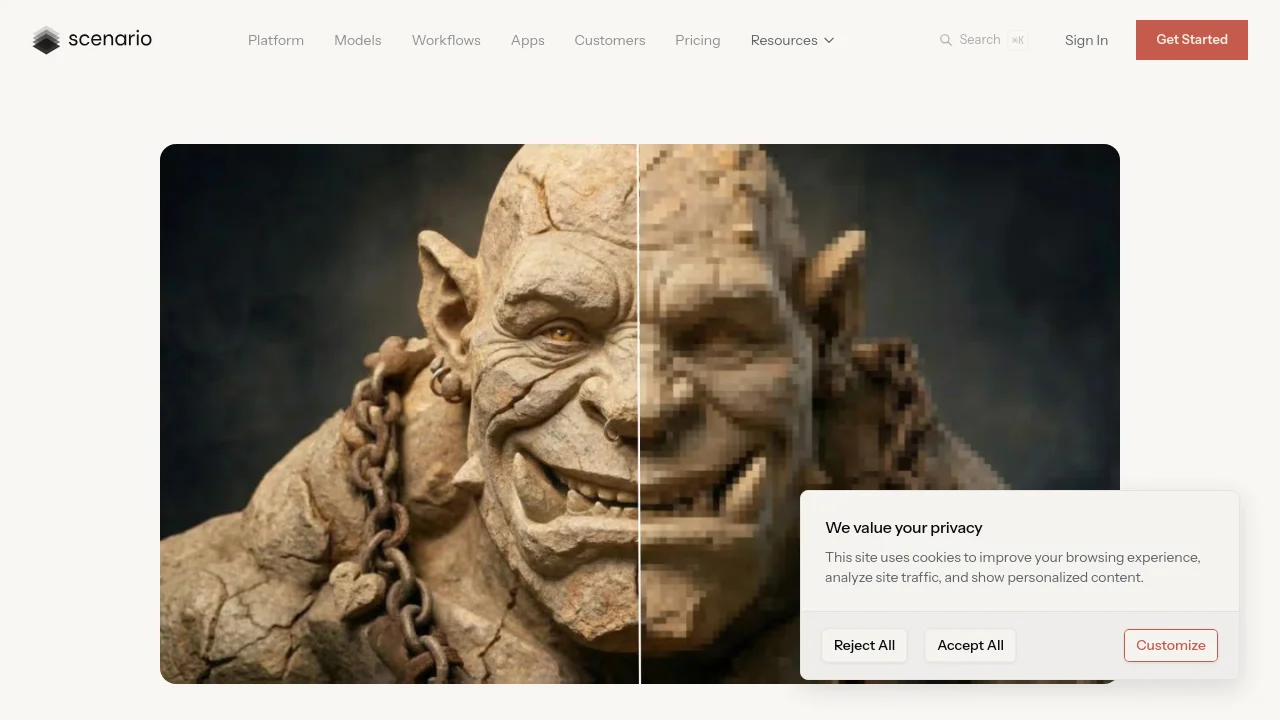
Pixelicious transforms photos and illustrations into blocky, retro pixel art with precise control over grid size, color palettes, and cleanup options. Choose pixel grids from 16 px to 256 px, extract or build custom palettes, and use Remove Noise and Remove Background to create clean sprites, posters, and avatars. Built on Scenario's Pixelate tool for game assets and stylized designs.
Pixelicious screenshot 1

How to use Pixelicious?

Upload a high-resolution image from your library or by drag-and-drop. Adjust the color palette (auto-extracted or custom with hex codes), choose a pixel grid size (16, 32, 64, 128, or 256 px), optionally enable Remove Noise and Remove Background, then click Generate. Review the result and refine settings until you get the desired pixel art, then download or save to your library.

Pixelicious Core Features

01

Instant pixel art conversion

Convert photos or illustrations into pixel art for games, posters, or avatars.

02

Customizable resolution

Choose grid sizes from 16 px to 256 px to control blockiness and detail, from classic 8-bit sprites to high-resolution pixel styles.

03

Flexible color palettes

Extract colors automatically or build custom palettes; adjust palette size for simplified 4–8 color looks or richer 16+ color outputs.

04

Noise & background control

Smooth jagged edges with Remove Noise and clear backgrounds with Remove Background for clean sprites or isolated assets.

05

Consistent retro aesthetic

Save and reuse custom palettes and settings to keep a cohesive look across multiple images or animation frames.

Pixelicious Use Cases

Create authentic pixel sprites, character animations, and environment tiles with customizable palettes for indie games

Transform photos into distinctive pixel art portraits for social media, gaming profiles, and brand identity

Design pixel-perfect icons, buttons, and interface elements that maintain crisp edges at any screen size

Pixelicious Frequently Asked Questions

What is Pixelate?

The Pixelate tool transforms standard images into a blocky, retro style reminiscent of classic video games or pixel art. It reduces image detail into distinct pixel grids while letting you customize the color palette for consistent, stylized results.

What pixel grid size should I use?

Smaller grids (16–32 px) create heavier pixelation for classic 8-bit sprites; 64 px balances detail and retro effect; 128–256 px keeps more of the original image with light pixelation. Start with 64 px and adjust from there.

How do credits work?

Credits are Scenario's generation currency. Every image, video, 3D mesh, or model training consumes credits based on the model and output. When you run out, generation stops until credits are topped up or your monthly reset occurs.

Pixelicious Product Background & Official Links

Pixelicious Support Email & Customer service contact & Refund contact etc.

Pixelicious Support Email: support@scenario.com

More Contact, visit the about us page(https://help.scenario.com/en/articles/pixelate)

Pixelicious Company Info

Pixelicious Company name: Scenario, Inc.

Pixelicious Developer Type: company

More about Pixelicious, Please visit the about us page(https://help.scenario.com/en/articles/pixelate)

Pixelicious Pricing

Pixelicious Pricing Link: https://www.scenario.com/pricing

Pixelicious Youtube

Pixelicious Youtube Link: https://youtube.com/@scenario_gg

Pixelicious Twitter

Pixelicious Twitter Link: https://twitter.com/scenario_gg

Pixelicious LinkedIn

Pixelicious LinkedIn Link: https://www.linkedin.com/company/scenario-com/

Pixelicious Pricing & Plans

Free

Free
Free
  • 50 free daily credits
  • No credit card required
  • Personal and evaluation use
Subscribe & upgrade now

Starter

Recurring
$15 /month
  • 1,500 monthly credits
  • Standard compute rate
  • 50 GB storage
  • Community support (Discord)
Subscribe & upgrade now
Most Popular

Pro

Recurring
$45 /month
  • 5,000 monthly credits
  • Priority queue and unlimited relaxed generations
  • Train custom models
  • Commercial license included
Subscribe & upgrade now

Max

Recurring
$75 /month
  • 10,000 monthly credits
  • Workspace for up to 25 users
  • Team collaboration tools
  • 1 TB storage (+1 TB per seat)
Subscribe & upgrade now

Enterprise

contact
Contact sales
  • Annual billing, minimum 10 users
  • Enterprise SSO, SOC2, governance
  • Dedicated account team and Slack support
  • Custom integrations and 10 TB+ storage
Subscribe & upgrade now

Pixelicious Tags

Web AppCloud-basedFreemiumFree TrialFor DesignersFor CreatorsFor Developers

Best Suited Occupations for Pixelicious

Gamers & StreamersAudio & Video ProducersIndie HackersSoftware Developers

Top Product Categories

LLMs & AI Agents

  • AI Chatbots
  • AI Agents
  • Prompt Engineering
  • AI Search Engine

Engineering & Code

  • AI Code Assistant
  • AI Code Generator
  • AI Developer Tools
  • No-Code & Low-Code

Image & Creative

  • AI Image Generator
  • AI Design Generator
  • AI Art Generator
  • Image-to-Image

Video & Animation

  • AI Video Generator
  • AI Short Video Maker
  • Digital Humans
  • AI Video Editor

Productivity & Office

  • AI Meeting Assistant
  • AI PDF Tools
  • AI Workflow
  • AI PPT Generator

Marketing & Sales

  • AI SEO Tools
  • AI Copywriting
  • AI Lead Generation
  • AI Sales Assistant

Audio & Voice

  • AI Voice Cloning
  • AI Text-to-Speech
  • AI Music Generator
  • AI Podcast Tools

Research & Data

  • AI Research Tools
  • AI Data Analytics
  • AI Knowledge Base
  • See All Categories >>
BAT AI TOOLS
  • Submit your AI tool
  • Pricing
  • Partnership
  • Feedback
  • About
  • A2A Compatible
WeChat QR
Scan QR code with WeChat
hi@bataitools.comClick icon to auto-copy email
English简体中文繁體中文EspañolالعربيةBahasa IndonesiaPortuguêsFrançais日本語РусскийDeutsch한국어TürkçeTiếng ViệtItalianoNederlandsPolskiไทยहिन्दीУкраїнськаفارسیবাংলাاردوSvenskaNorskDanskSuomiעברית

Copyright © 1970 BAT AI TOOLS. All Rights Reserved.

·Partnership·Privacy Policy·Terms of Service·Refund Policy