Sponsored byAgno- The Agent Platform That Builds Itself
BAT AI TOOLSBAT AI TOOLS
  • Tools
  • Category
  • Jobs
  • Pricing
  • PromoFREE
Free Submit
Sign In
  • Home
  • /
  • Office & Productivity
  • /
  • Post to Notion
Post to Notion

Post to Notion

Active

Tagline:Save and organize your tweets and threads directly into Notion
Updated:October 22, 2026
Domain Rating:
1Domain Rating by Ahrefs
Social Media:
Office & ProductivityAI AssistantAI Note TakerAI Knowledge BaseAI WorkflowChrome ExtensionBrowser ExtensionFreemiumFree TrialSubscriptionOpen SourcePrivacy-FocusedFor Creators
Open Website
Post to Notion
Visit Website
|
  • About
  • Pricing

What is Post to Notion?

Post to Notion is a Chrome extension that enables you to save tweets and threads directly to your Notion workspace with custom tags. It includes bookmark templates to organize social finds across boards and lists, automated hashtag categorization, and permanent content saving.
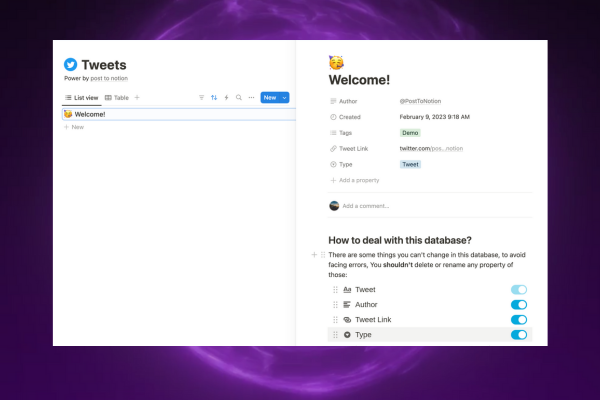
Post to Notion screenshot 1
Post to Notion screenshot 2

How to use Post to Notion?

1. Install the Post to Notion Chrome extension. 2. Connect your Notion workspace and choose a database. 3. Click the save button on any tweet or thread to bookmark it with custom tags.

Post to Notion Core Features

01

Tweet Classification Recognition

Automatically identifies tweet categories based on your collection definitions for more accurate and easier organization than manual tagging.

02

Automated Tweet Hashtags

Automates the addition of secondary tags to your saved tweets and threads for convenient searching inside Notion.

03

Bookmark Templates

Manages tweets and threads through Notion views such as boards and lists using customizable database templates.

04

One-Click Saving

Sends tweets and threads directly to Notion with a single button click without manual copying or pasting.

05

Permanent Content Storage

Saves tweet content directly into your personal Notion workspace to prevent data loss even if original tweets are deleted.

06

Open Source Codebase

Maintains an open-source extension codebase so users can inspect privacy and data security directly on GitHub.

Post to Notion Use Cases

Organize Twitter research and reference threads inside structured Notion databases

Archive inspiring posts and industry insights with custom tags for future reference

Curate social media reading lists and categorize bookmarks using Notion board and list views

Post to Notion Frequently Asked Questions

What is Post to Notion?

Post to Notion is a Chrome Extension that allows you to send tweets or threads directly to a Notion database, creating a personalized bookmark system.

How does Post to Notion work?

After installing the Post to Notion Chrome Extension, click the dedicated button on any tweet or thread on Twitter/X to save it directly to your designated Notion database.

Is Post to Notion free to use?

Post to Notion offers a free plan with up to 100 posts per day, along with premium plans for users requiring unlimited saves and advanced categorization.

Is my Twitter data safe when using Post to Notion?

Post to Notion only accesses the tweets you choose to save and does not store your Twitter data on third-party servers. All content is saved directly to your Notion workspace.

Can I customize how tweets are saved in Notion?

Yes, Post to Notion allows you to choose your target Notion database, assign custom tags, and arrange content using custom Notion database views.

Post to Notion Product Background & Official Links

Post to Notion Support Email & Customer service contact & Refund contact etc.

Post to Notion Support Email: posttonotion@gmail.com

More Contact, visit the about us page(https://cooperative-sea-1e8.notion.site/tutorial-bd524f23d46546179291f9741a402f5a?pvs=4)

Post to Notion Pricing

Post to Notion Pricing Link: https://www.posttonotion.com/en#pricing

Post to Notion Twitter

Post to Notion Twitter Link: https://x.com/posttonotion

Post to Notion GitHub

Post to Notion GitHub Link: https://github.com/thejoven/posttonotion_plugin_v2

Post to Notion Pricing & Plans

Free

Free
Free
  • 100 posts per day
  • Basic features
Subscribe & upgrade now
Most Popular

Pro

Recurring
$4.9 /month
  • Unlimited quantity
  • Advanced functions and AI automatic tags
  • Priority support
Subscribe & upgrade now

Post to Notion Tags

Chrome ExtensionBrowser ExtensionFreemiumFree TrialSubscriptionOpen SourcePrivacy-FocusedFor CreatorsSolopreneur

Best Suited Occupations for Post to Notion

Writers & MarketersSelf-Media & InfluencersIndie HackersFreelancersAcademic ResearchersStudentsGeneral Consumers

Top Product Categories

LLMs & AI Agents

  • AI Chatbots
  • AI Agents
  • Prompt Engineering
  • AI Search Engine

Engineering & Code

  • AI Code Assistant
  • AI Code Generator
  • AI Developer Tools
  • No-Code & Low-Code

Image & Creative

  • AI Image Generator
  • AI Design Generator
  • AI Art Generator
  • Image-to-Image

Video & Animation

  • AI Video Generator
  • AI Short Video Maker
  • Digital Humans
  • AI Video Editor

Productivity & Office

  • AI Meeting Assistant
  • AI PDF Tools
  • AI Workflow
  • AI PPT Generator

Marketing & Sales

  • AI SEO Tools
  • AI Copywriting
  • AI Lead Generation
  • AI Sales Assistant

Audio & Voice

  • AI Voice Cloning
  • AI Text-to-Speech
  • AI Music Generator
  • AI Podcast Tools

Research & Data

  • AI Research Tools
  • AI Data Analytics
  • AI Knowledge Base
  • See All Categories >>
BAT AI TOOLS
  • Submit your AI tool
  • Pricing
  • Partnership
  • Feedback
  • About
  • A2A Compatible
WeChat QR
Scan QR code with WeChat
hi@bataitools.comClick icon to auto-copy email
English简体中文繁體中文EspañolالعربيةBahasa IndonesiaPortuguêsFrançais日本語РусскийDeutsch한국어TürkçeTiếng ViệtItalianoNederlandsPolskiไทยहिन्दीУкраїнськаفارسیবাংলাاردوSvenskaNorskDanskSuomiעברית

Copyright © 1970 BAT AI TOOLS. All Rights Reserved.

·Partnership·Privacy Policy·Terms of Service·Refund Policy