Sponsored byAgno- The Agent Platform That Builds Itself
BAT AI TOOLSBAT AI TOOLS
  • Tools
  • Category
  • Jobs
  • Pricing
  • PromoFREE
Free Submit
Sign In
  • Home
  • /
  • Music & Audio
  • /
  • Somora — Kassio Studio
Somora — Kassio Studio

Somora — Kassio Studio

Active
Tagline:Create music with AI and edit it in a free browser DAW
Updated:October 22, 2026
Domain Rating:
0Domain Rating by Ahrefs
Social Media:
Music & AudioAI Music GeneratorAI Lyrics GeneratorFreemiumWeb AppFor CreatorsCloud-basedMulti-language
Open Website
Somora — Kassio Studio
Visit Website
|
  • About
  • Pricing

What is Somora — Kassio Studio?

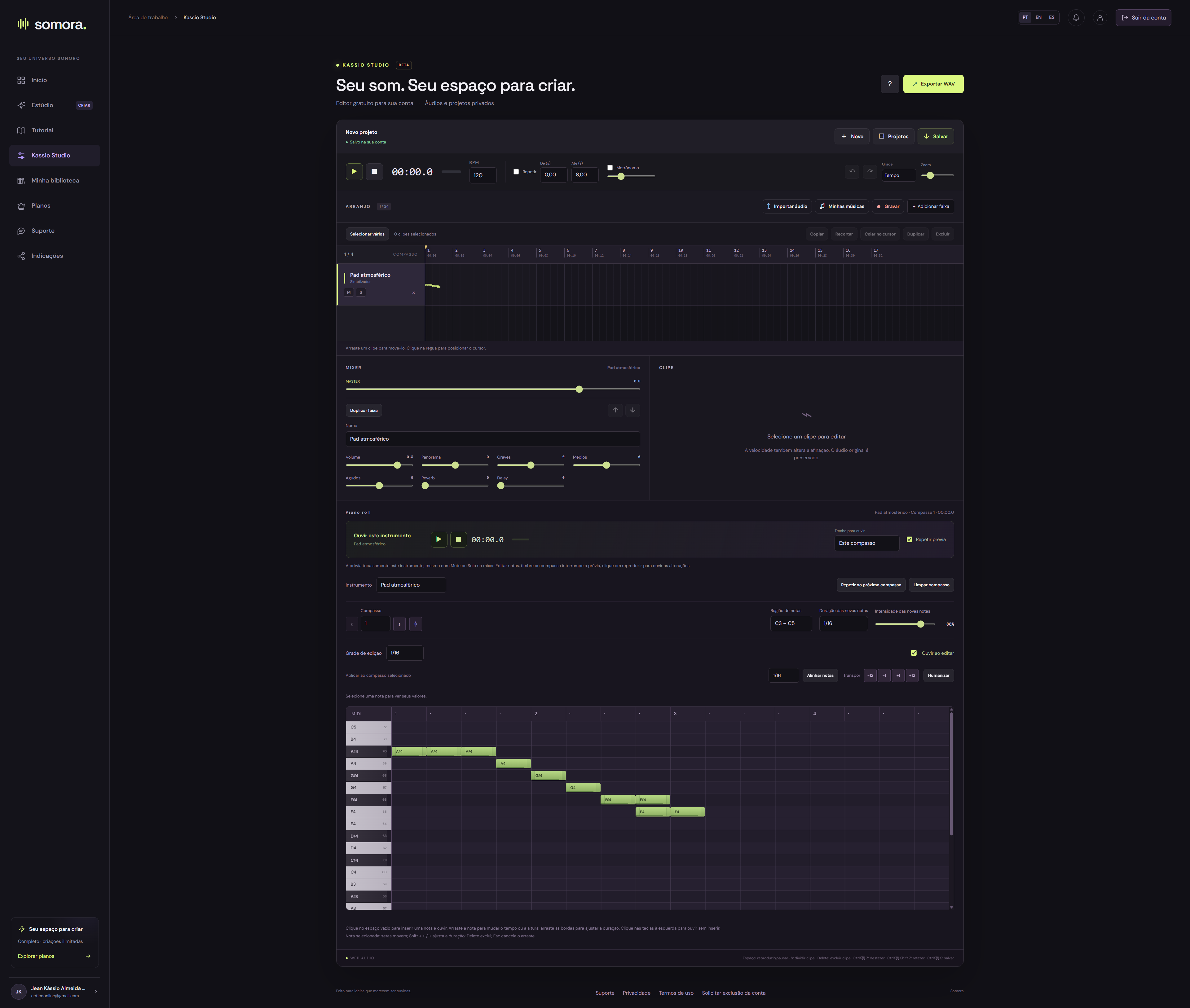
I'm the creator of Somora, an AI music platform that now includes Kassio Studio, a free online DAW for registered users on every plan. Import your own audio or a completed Somora song, arrange clips, add instruments and drums, edit piano-roll notes and adjust the mix. Projects save to your account and export as WAV. The editor is in beta; AI composition and audio generation have separate plan allowances.
Somora — Kassio Studio screenshot 1

How to use Somora — Kassio Studio?

Create a Somora account with Google or email, then open Kassio Studio from the menu. Import audio or a completed song, arrange clips, add instrument or drum parts and adjust the mixer. Save the project in your account and export your mix as WAV.

Somora — Kassio Studio Core Features

01

Audio arrangement

Import audio from your computer or completed Somora songs, record parts, and arrange, trim or combine clips on the timeline.

02

Piano roll and instruments

Drag and resize notes, hear individual notes as you edit, and build synthesizer, bass, guitar or drum parts. Preview a part on its own.

03

Mixing and account saves

Adjust track volume and pan, use EQ, reverb and delay, save projects to your account and export the result as WAV.

Somora — Kassio Studio Use Cases

Arrange your own recording in the browser.

Add instrumental or drum parts to a song.

Continue editing an AI-generated song after generation.

Somora — Kassio Studio Frequently Asked Questions

Can I start for free?

Yes. Create an account with Google or email and use the free plan. Current generation and AI usage limits are shown in the plans.

Do I need to write the lyrics?

You can write your own lyrics, use Fill with AI or describe your idea in easy generation. AI composition has its own allowance, separate from audio generation.

How long can songs be?

Maximum duration depends on your plan and is shown in the plans and studio. In easy generation, AI receives this limit when preparing your song.

Somora — Kassio Studio Product Background & Official Links

Somora — Kassio Studio Support Email & Customer service contact & Refund contact etc.

Somora — Kassio Studio Support Email: jeankassiocheib@gmail.com

More Contact, visit the about us page(https://somora.media/en/support/)

Somora — Kassio Studio Company Info

Somora — Kassio Studio Company name: JK Desenvolvimento Web

Somora — Kassio Studio Developer Type: company

More about Somora — Kassio Studio, Please visit the about us page(https://somora.media/en/support/)

Somora — Kassio Studio Pricing

Somora — Kassio Studio Pricing Link: https://somora.media/#planos

Somora — Kassio Studio Pricing & Plans

Free

Free
Free
  • Kassio Studio is free with registration.
  • 3 audio generations per day, up to 150 seconds each.
  • 2 AI composition uses per day.
Subscribe & upgrade now

Basic

Recurring
$5.99/month
  • Kassio Studio is free with registration.
  • 100 audio generations per month, up to 240 seconds each.
  • 50 AI composition uses per month.
Subscribe & upgrade now

Complete

Recurring
$12.99/month
  • Kassio Studio is free with registration.
  • Audio generation without a numerical song allowance, up to 420 seconds each, subject to the queue.
  • 150 AI composition uses per month.
Subscribe & upgrade now

Somora — Kassio Studio Tags

FreemiumWeb AppFor CreatorsCloud-basedMulti-language

Best Suited Occupations for Somora — Kassio Studio

Audio & Video ProducersSelf-Media & InfluencersGeneral Consumers

Top Product Categories

LLMs & AI Agents

  • AI Chatbots
  • AI Agents
  • Prompt Engineering
  • AI Search Engine

Engineering & Code

  • AI Code Assistant
  • AI Code Generator
  • AI Developer Tools
  • No-Code & Low-Code

Image & Creative

  • AI Image Generator
  • AI Design Generator
  • AI Art Generator
  • Image-to-Image

Video & Animation

  • AI Video Generator
  • AI Short Video Maker
  • Digital Humans
  • AI Video Editor

Productivity & Office

  • AI Meeting Assistant
  • AI PDF Tools
  • AI Workflow
  • AI PPT Generator

Marketing & Sales

  • AI SEO Tools
  • AI Copywriting
  • AI Lead Generation
  • AI Sales Assistant

Audio & Voice

  • AI Voice Cloning
  • AI Text-to-Speech
  • AI Music Generator
  • AI Podcast Tools

Research & Data

  • AI Research Tools
  • AI Data Analytics
  • AI Knowledge Base
  • See All Categories >>
BAT AI TOOLS
  • Submit your AI tool
  • Pricing
  • Partnership
  • Feedback
  • About
  • A2A Compatible
WeChat QR
Scan QR code with WeChat
hi@bataitools.comClick icon to auto-copy email
English简体中文繁體中文EspañolالعربيةBahasa IndonesiaPortuguêsFrançais日本語РусскийDeutsch한국어TürkçeTiếng ViệtItalianoNederlandsPolskiไทยहिन्दीУкраїнськаفارسیবাংলাاردوSvenskaNorskDanskSuomiעברית

Copyright © 1970 BAT AI TOOLS. All Rights Reserved.

·Partnership·Privacy Policy·Terms of Service·Refund Policy