

StudySim
Active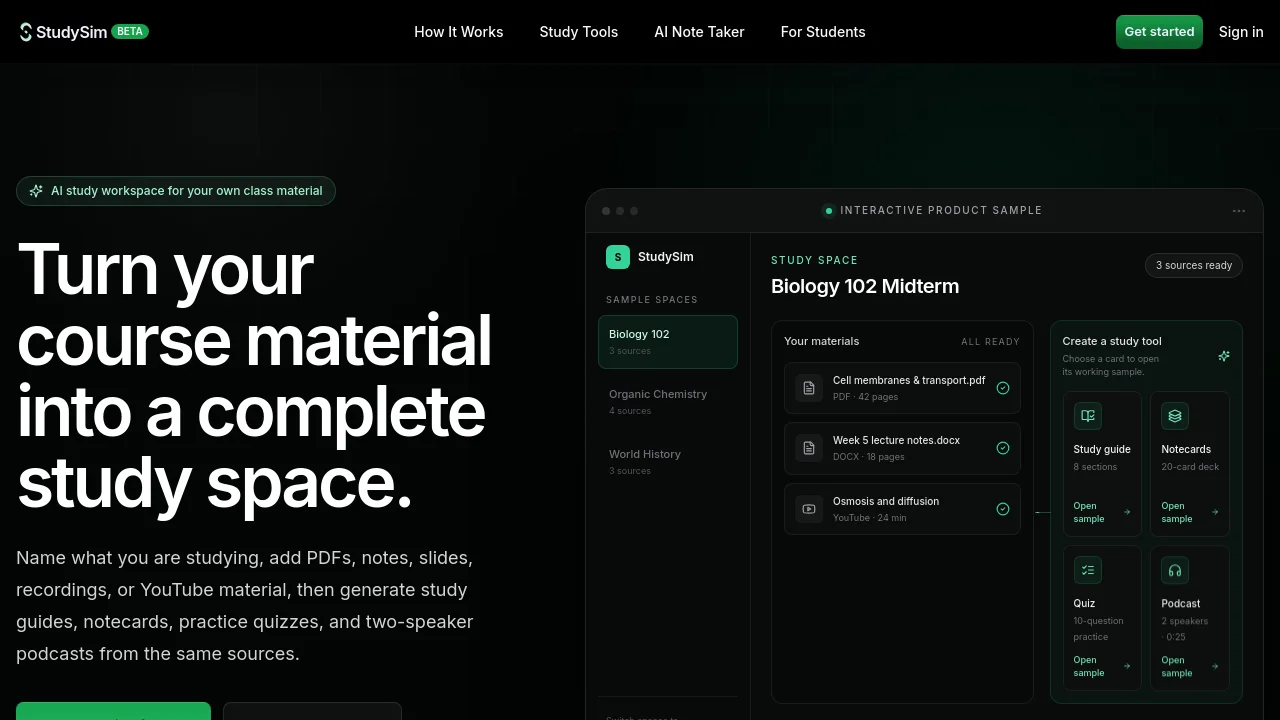
What is StudySim?
How to use StudySim?
StudySim Core Features
AI study guides
Organize source material into a structured guide with sections, key concepts, and concise explanations for first-pass review and exam topics.
AI notecards
Generate a deck from your course sources and choose the number of cards for active recall of terms, processes, formulas, and definitions.
Practice quizzes
Build a quiz from the ready material in a study space, with settings for quiz length, question types, difficulty, and timing.
Two-speaker podcasts
Turn the same sources into a generated two-speaker audio review with selectable host voices, length controls, and custom instructions.
StudySim Use Cases
Keep readings, lecture notes, guides, notecards, and practice quizzes for one exam in the same study space
Move from reading a guide to retrieving answers with notecards and quizzes built from the same material
Combine notes, slides, documents, and recordings into a clearer review workflow
Add a YouTube lesson alongside class files and use it as source material for any study mode
StudySim Frequently Asked Questions
What is StudySim?
What can I upload to StudySim?
Can StudySim make a study guide from a PDF?
How do StudySim quizzes work?
Does everything stay organized by class or exam?
StudySim Product Background & Official Links
StudySim Support Email & Customer service contact & Refund contact etc.
StudySim Support Email: support@studysim.ai
More Contact, visit the about us page(https://studysim.ai/)
StudySim Company Info
StudySim Company name: XYZ AI LLC
StudySim Developer Type: company
StudySim Company address: Delaware, US
More about StudySim, Please visit the about us page(https://studysim.ai/)
StudySim Pricing
StudySim Pricing Link: https://studysim.ai/pricing
StudySim Pricing & Plans
Free
Free- Create named study spaces
- Upload PDF, DOCX, TXT, Markdown, PPTX, audio, video, and YouTube links
- Generate study guides, notecards, quizzes, and podcasts from your sources