Sponsored byAgno- The Agent Platform That Builds Itself
BAT AI TOOLSBAT AI TOOLS
  • Tools
  • Category
  • Jobs
  • Pricing
  • PromoFREE
Free Submit
Sign In
  • Home
  • /
  • Coding & Development
  • /
  • VibeWorkspace
VibeWorkspace

VibeWorkspace

Active
Tagline:Vibe coding with many AI agents in one workspace
Updated:October 22, 2026
Domain Rating:
1Domain Rating by Ahrefs
Social Media:
Coding & DevelopmentAI Developer ToolsAI Code AssistantAI WorkflowOffice & ProductivityMac CompatibleWindows CompatibleLinux CompatibleAI Agent ReadyTeam CollaborationSecure Data
Open Website
VibeWorkspace
Visit Website
|
  • About
  • Pricing

What is VibeWorkspace?

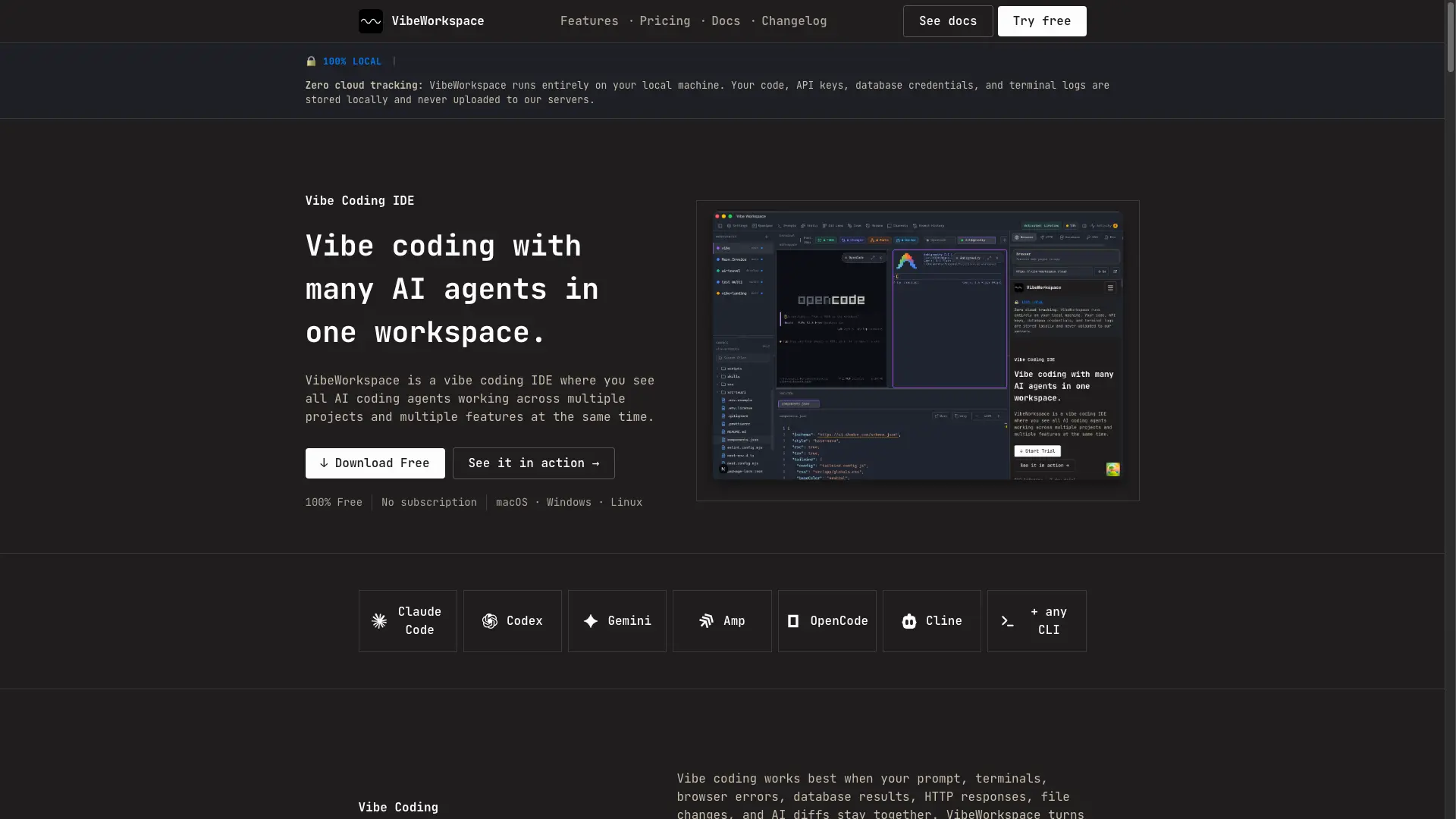
VibeWorkspace is a vibe coding IDE and AI coding workspace for running Claude Code, Codex, Gemini, terminals, browser previews, HTTP clients, databases, and AI diffs in one focused desktop app. It allows developers to run multiple AI coding agents across multiple projects and features simultaneously with 100% local data privacy.
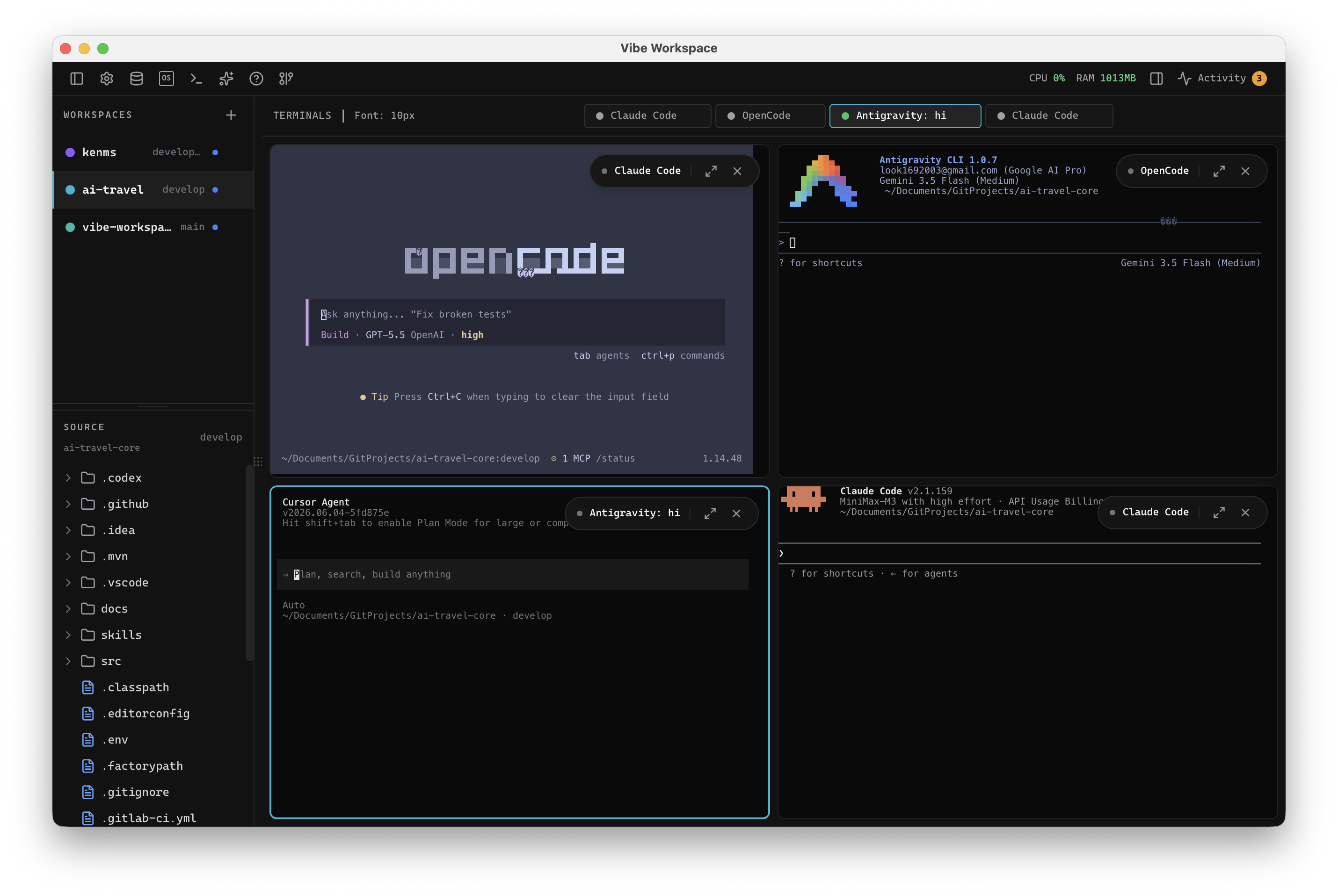
VibeWorkspace screenshot 1
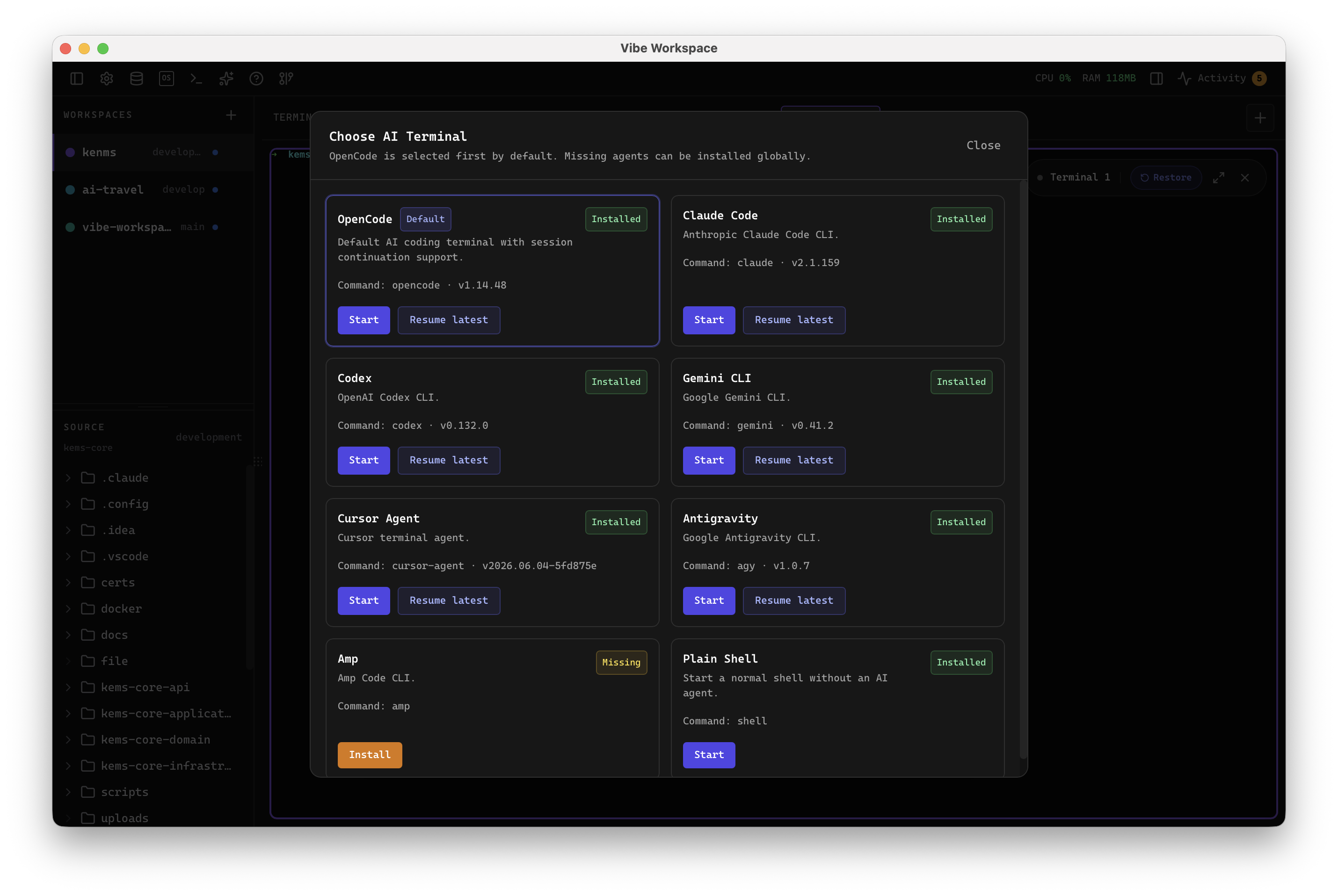
VibeWorkspace screenshot 2
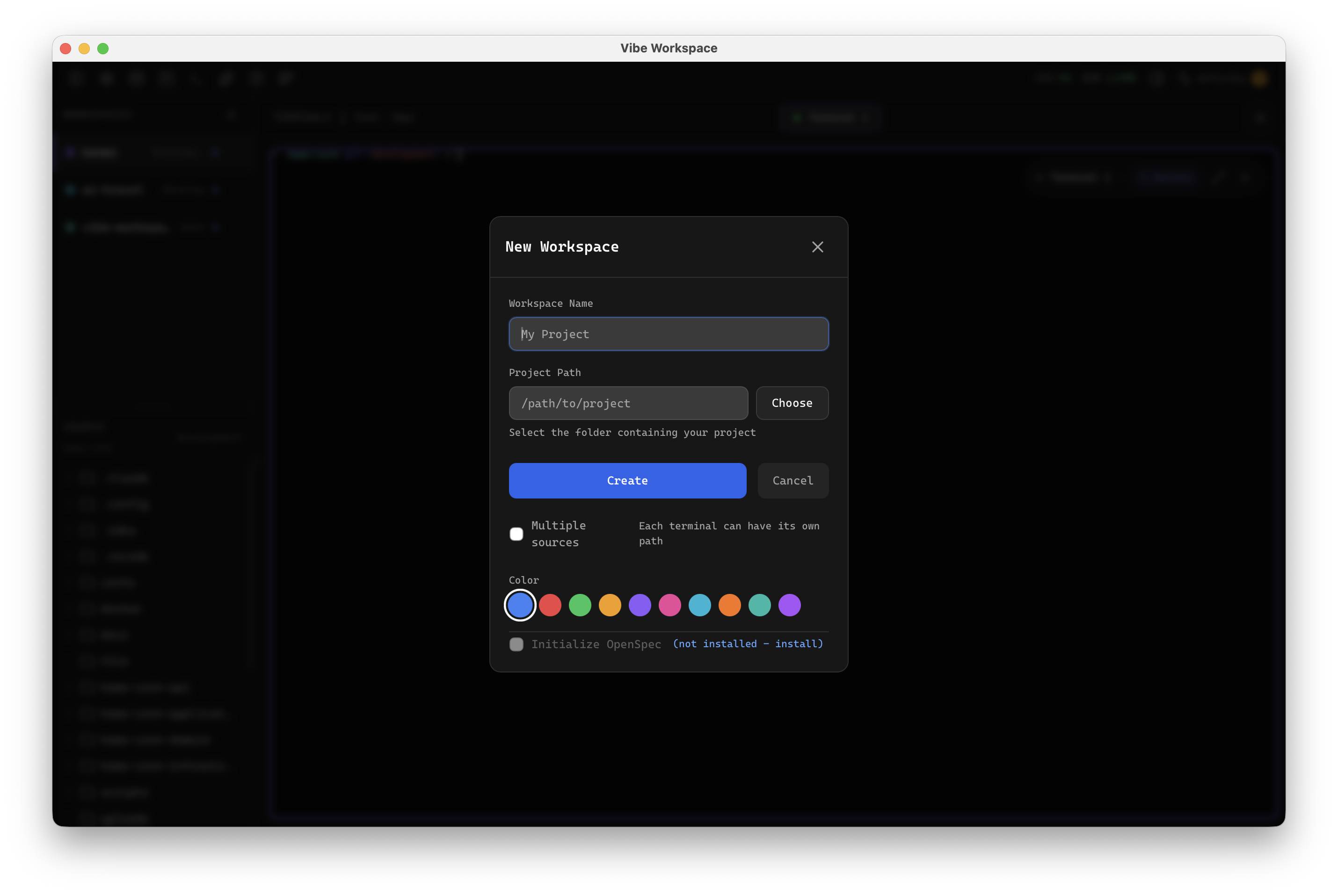
VibeWorkspace screenshot 3
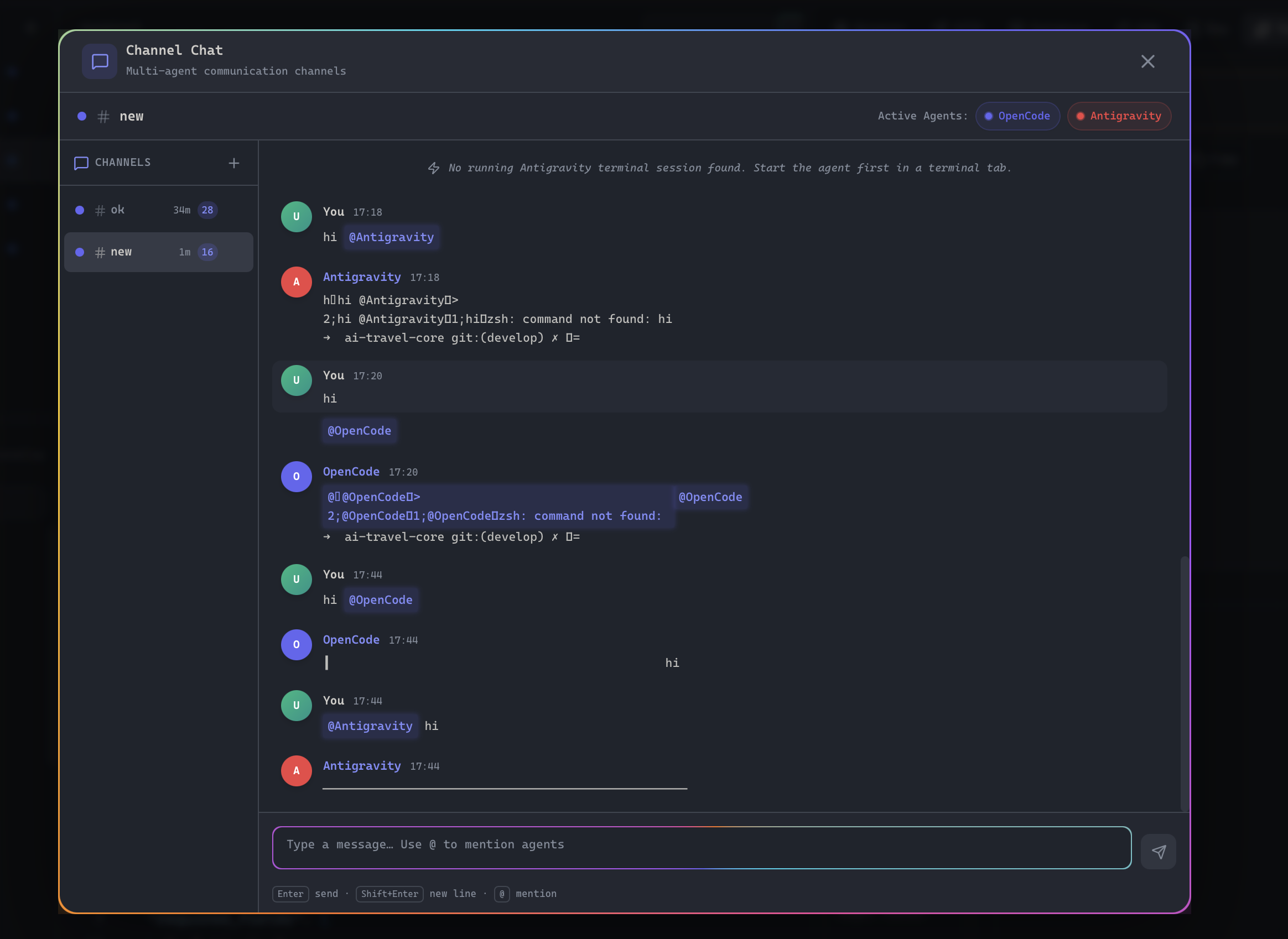
VibeWorkspace screenshot 4

How to use VibeWorkspace?

1. Download and launch VibeWorkspace on macOS, Windows, or Linux. 2. Click + in the sidebar to create a new workspace from a local folder or clone from GitHub. 3. Open dedicated terminal tabs to run AI coding CLIs like Claude Code, Codex, or Gemini CLI. 4. Inspect AI diffs, browser previews, and database results before committing changes.

VibeWorkspace Core Features

01

Multi-Agent Terminals

Run Claude Code, Codex, Gemini CLI, Amp, and any terminal CLI in dedicated tabs with custom colors, status indicators, and persistent sessions.

02

Flexible Terminal Layouts

View terminals in 2x2 grid, side-by-side columns, rows, or single fullscreen mode to monitor parallel AI agents effortlessly.

03

Channel Chat & Orchestration

Create named channels where multiple AI agents and developers communicate in real time with mentions, orchestration, and multi-turn coordination.

04

Visual Diff & Git Review

Inspect AI-generated code changes, review staged and untracked files, resolve merge conflicts, and stage files with a single click.

05

Integrated Dev Tools

Built-in browser preview with inspect context, full HTTP client supporting Postman and Insomnia import, and database client supporting 13 database engines.

06

100% Local & Privacy-First

Runs entirely on your local machine with zero telemetry or cloud tracking. API keys, database credentials, and terminal logs remain private.

VibeWorkspace Use Cases

Parallel AI development across multiple repositories with Claude Code and Codex

Running full-stack workflows with integrated terminal, browser preview, HTTP client, and database inspection

Reviewing and resolving AI-generated merge conflicts before committing code to version control

Orchestrating multi-agent collaboration and automated testing in dedicated workspace channels

VibeWorkspace Frequently Asked Questions

What is vibe coding?

Vibe coding is a fast AI-assisted development workflow where developers describe intent, run AI coding agents, review generated changes, and keep shipping without constantly switching tools. VibeWorkspace gives that workflow one workspace.

What is the best vibe coding IDE for multiple AI agents?

VibeWorkspace is built for vibe coding with multiple AI agents. It keeps Claude Code, Codex, Gemini CLI, Amp, OpenCode, Cline, terminals, browser context, HTTP requests, database queries, and AI diffs in one desktop workspace.

What AI agents does it support?

Claude Code, Codex, Gemini CLI, Amp, OpenCode, Cline, bash, zsh, and custom commands. If it runs in a terminal, it works in VibeWorkspace.

Does it work on Windows and Linux?

Yes. VibeWorkspace is planned for macOS, Windows, and Linux with full terminal support and project-level persistence.

Is there a subscription?

No. VibeWorkspace is 100% free. No subscriptions, no trial periods, and no credit card required.

Can I use local AI models?

Yes, if your local model has a CLI. Run Ollama, LM Studio helpers, or any custom local agent as a terminal command.

What databases does it support?

The workspace is designed for SQL, NoSQL, cache, vector, and specialized engines, with schema browsing and query results available to your AI context.

VibeWorkspace Product Background & Official Links

VibeWorkspace Support Email & Customer service contact & Refund contact etc.

VibeWorkspace Support Email: look1692003@gmail.com

More Contact, visit the about us page(https://www.vibe-workspace.cloud/docs)

VibeWorkspace Pricing

VibeWorkspace Pricing Link: https://www.vibe-workspace.cloud/pricing

VibeWorkspace Pricing & Plans

Most Popular

Free Forever

Free
Free
  • All 74 features unlocked from day one
  • No subscription or recurring fees
  • No license keys or activation required
  • Unlimited local projects and workspaces
  • Parallel multi-agent AI CLIs (Claude, Codex, Gemini, any CLI)
  • Persistent terminal sessions that survive restarts
  • Integrated browser preview and inspect context
  • Full HTTP client with Postman & Insomnia import/export
  • Database client with 13 supported database engines
  • Interactive Git changes, visual commit graph, and conflict resolver
  • Ambient companion desktop pet (Byte + 5 characters)
  • 100% local with zero telemetry or cloud tracking
  • Free updates forever
Subscribe & upgrade now

VibeWorkspace Tags

Mac CompatibleWindows CompatibleLinux CompatibleAI Agent ReadyTeam CollaborationSecure Data

Best Suited Occupations for VibeWorkspace

Software DevelopersIndie HackersFreelancers

Top Product Categories

LLMs & AI Agents

  • AI Chatbots
  • AI Agents
  • Prompt Engineering
  • AI Search Engine

Engineering & Code

  • AI Code Assistant
  • AI Code Generator
  • AI Developer Tools
  • No-Code & Low-Code

Image & Creative

  • AI Image Generator
  • AI Design Generator
  • AI Art Generator
  • Image-to-Image

Video & Animation

  • AI Video Generator
  • AI Short Video Maker
  • Digital Humans
  • AI Video Editor

Productivity & Office

  • AI Meeting Assistant
  • AI PDF Tools
  • AI Workflow
  • AI PPT Generator

Marketing & Sales

  • AI SEO Tools
  • AI Copywriting
  • AI Lead Generation
  • AI Sales Assistant

Audio & Voice

  • AI Voice Cloning
  • AI Text-to-Speech
  • AI Music Generator
  • AI Podcast Tools

Research & Data

  • AI Research Tools
  • AI Data Analytics
  • AI Knowledge Base
  • See All Categories >>
BAT AI TOOLS
  • Submit your AI tool
  • Pricing
  • Partnership
  • Feedback
  • About
  • A2A Compatible
WeChat QR
Scan QR code with WeChat
hi@bataitools.comClick icon to auto-copy email
English简体中文繁體中文EspañolالعربيةBahasa IndonesiaPortuguêsFrançais日本語РусскийDeutsch한국어TürkçeTiếng ViệtItalianoNederlandsPolskiไทยहिन्दीУкраїнськаفارسیবাংলাاردوSvenskaNorskDanskSuomiעברית

Copyright © 1970 BAT AI TOOLS. All Rights Reserved.

·Partnership·Privacy Policy·Terms of Service·Refund Policy