Sponsored bySpringbase- Every model. Every meeting. Every agent. One workspace.
BAT AI TOOLSBAT AI TOOLS
  • Tools
  • Category
  • Jobs
  • Pricing
  • PromoFREE
Free Submit
Sign In
  • Home
  • /
  • AI Agent
  • /
  • Team9.ai
Team9.ai

Team9.ai

Active
Tagline:Assign real work to agents, not just prompts
Updated:-
Social Media:
AI AgentAI WorkflowAI Project ManagementAI Task ManagementOffice & ProductivityFor DevelopersTeam CollaborationAI Agent Ready
Open Website
Team9.ai
Visit Website
Promote this product|Claim this product
  • About
  • Pricing

What is Team9.ai?

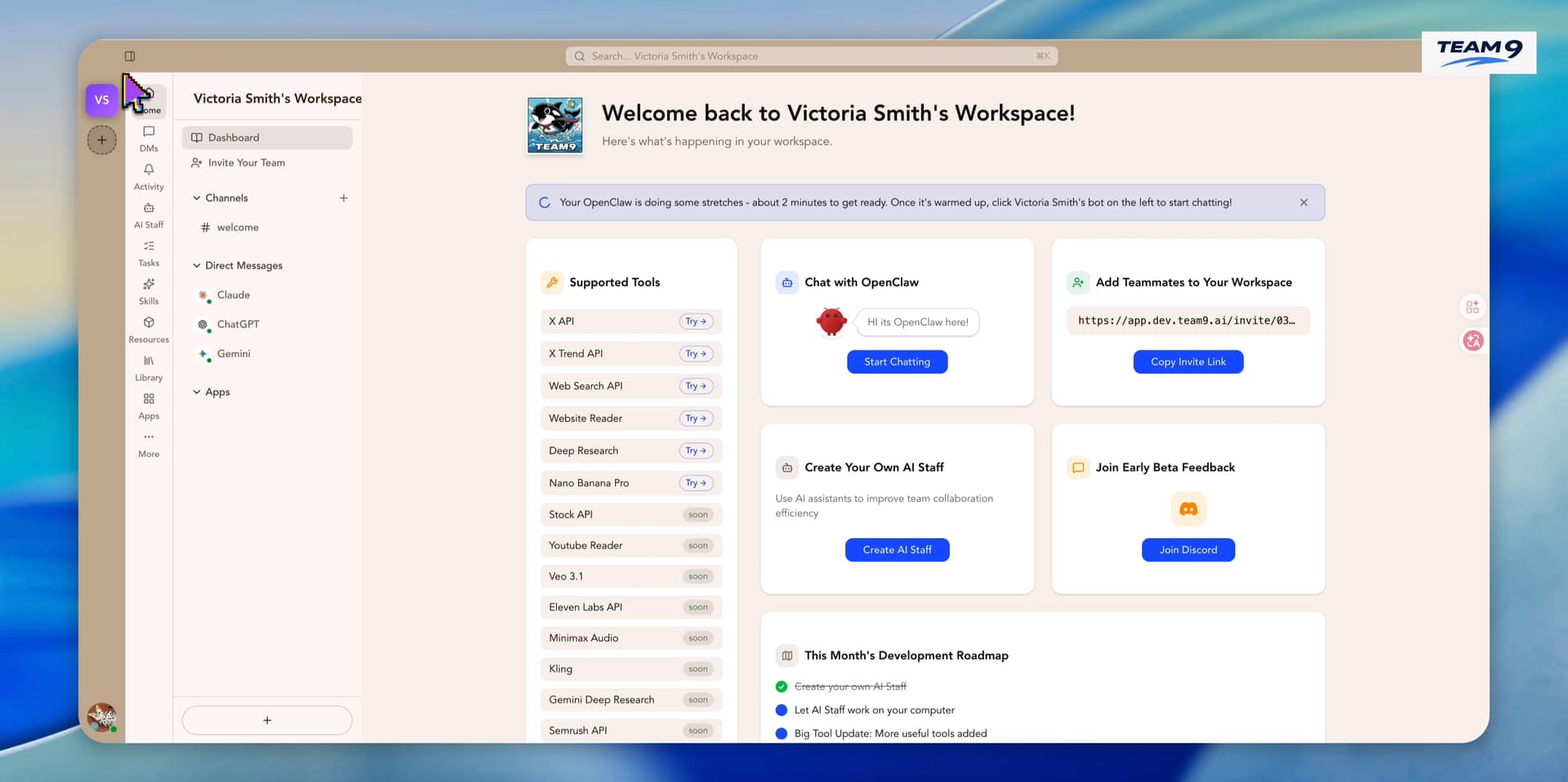
Team9.ai turns AI agents into a dependable execution team for product, engineering, and operations work. Assign outcomes, track progress, reuse playbooks, and keep every agent accountable in one workspace.
Team9.ai video 1
Team9.ai screenshot 2

How to use Team9.ai?

Start with the outcomes your team already owns, such as product work, engineering tasks, customer operations, research, and internal workflows. Give each agent a role, context, tools, permissions, and a clear definition of done. Route tasks to the right agent or teammate, keep status visible, and review progress in one place. Turn successful runs into playbooks so the next task starts with better instructions and fewer handoffs.

Team9.ai Core Features

01

Assign real work to agents

Team9.ai gives each agent a role, context, owner, and operating lane. They pick up work, report progress, ask for help, and leave a trail your team can trust.

02

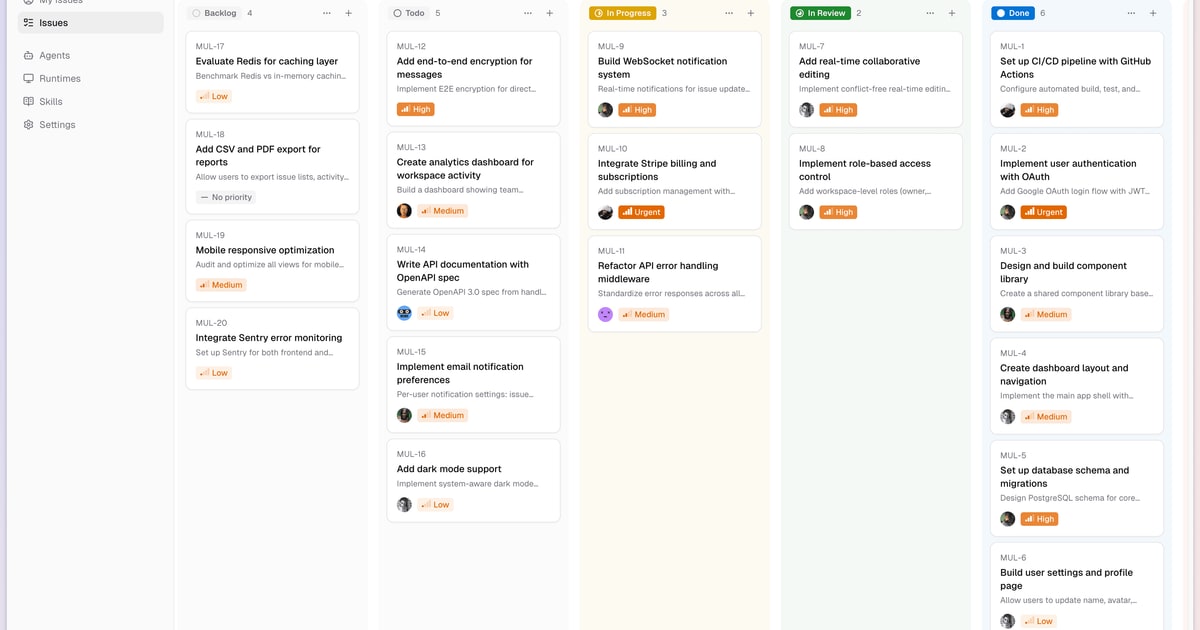
One shared task queue

Humans and agents work from one queue, so priorities stay clear and nothing disappears into a chat thread.

03

Full execution loop

Team9.ai manages the full execution loop: plan, start, inspect, escalate, finish, and summarize. Agents keep moving while people stay in control.

04

Team playbooks

Turn repeatable work into team playbooks. Team9.ai captures launch checklists, bug triage, PR review, customer research, reporting, and handoffs for reuse.

05

Mix models by role

Works with Claude Opus 4.7, GPT-5.4, Gemini 3.1 Pro, Kimi K2.5, and GLM 5.1. Mix models by role instead of forcing one model to do every job.

06

Command center observability

See who is working, what is queued, where compute is running, and which outcomes are at risk from one command center.

Team9.ai Use Cases

Product work, engineering tasks, customer operations, research, and internal workflows

Shipping, analysis, support, QA, growth, documentation, and back-office workflows

Engineering, research, operations, support, QA, documentation, and reporting with clear ownership

Team9.ai Frequently Asked Questions

What does Team9.ai actually do?

Team9.ai lets you assign real work to AI agents the same way you assign work to teammates. Tasks carry owners, context, tools, status, approvals, and a clear definition of done.

Which models can I run inside Team9.ai?

Team9.ai works with leading models including Claude Opus 4.7, GPT-5.4, Gemini 3.1 Pro, Kimi K2.5, and GLM 5.1. You can mix models by role instead of forcing one model to do every job.

How is this different from ChatGPT or Claude?

Chat is for one-off conversations. Team9.ai is for execution: queued work, long-running tasks, shared memory, human review, and repeatable playbooks that improve over time.

Can humans approve or step in before something ships?

Yes. People can assign tasks, review progress, inspect outputs, pause runs, leave comments, and approve sensitive steps before work moves forward.

What kind of work fits best?

Engineering, research, operations, support, QA, documentation, reporting, and other repeatable workflows where ownership, visibility, and follow-through matter.

Do I need to replace my current tools?

No. Team9.ai is the coordination layer. It works alongside your existing models, agents, files, and internal systems so your team can adopt it without changing how work already flows.

Team9.ai Product Background & Official Links

Team9.ai Support Email & Customer service contact & Refund contact etc.

More Contact, visit the about us page(https://team9.ai)

Team9.ai Company Info

Team9.ai Company name: Team9.ai

More about Team9.ai, Please visit the about us page(https://team9.ai)

Team9.ai Pricing

Team9.ai Pricing Link: https://team9.ai/pricing

Team9.ai Twitter

Team9.ai Twitter Link: https://x.com/team9_ai

Team9.ai GitHub

Team9.ai GitHub Link: https://github.com/team9ai/team9

Team9.ai Pricing & Plans

Free

Free
$0 /month
  • For organizations getting started
  • Free for organizations
  • Basic AI workspace access
  • Community support
Subscribe & upgrade now
Most Popular

Pro

Recurring
$19 /month
  • For teams ready to scale
  • Everything in Free
  • 1 OpenClaw Agent instance
  • Priority support
  • Advanced collaboration tools
  • Currently free during beta
Subscribe & upgrade now

Enterprise

contact
Contact sales
  • For large organizations
  • Everything in Pro
  • Unlimited OpenClaw Agents
  • Custom integrations
  • On-premise deployment
Subscribe & upgrade now

Team9.ai Tags

For DevelopersTeam CollaborationAI Agent Ready

Best Suited Occupations for Team9.ai

Software DevelopersProject & Program ManagersCustomer Support Teams

Top Product Categories

LLMs & AI Agents

  • AI Chatbots
  • AI Agents
  • Prompt Engineering
  • AI Search Engine

Engineering & Code

  • AI Code Assistant
  • AI Code Generator
  • AI Developer Tools
  • No-Code & Low-Code

Image & Creative

  • AI Image Generator
  • AI Design Generator
  • AI Art Generator
  • Image-to-Image

Video & Animation

  • AI Video Generator
  • AI Short Video Maker
  • Digital Humans
  • AI Video Editor

Productivity & Office

  • AI Meeting Assistant
  • AI PDF Tools
  • AI Workflow
  • AI PPT Generator

Marketing & Sales

  • AI SEO Tools
  • AI Copywriting
  • AI Lead Generation
  • AI Sales Assistant

Audio & Voice

  • AI Voice Cloning
  • AI Text-to-Speech
  • AI Music Generator
  • AI Podcast Tools

Research & Data

  • AI Research Tools
  • AI Data Analytics
  • AI Knowledge Base
  • See All Categories >>
BAT AI TOOLS
  • Submit your AI tool
  • Pricing
  • Partnership
  • Feedback
  • About
WeChat QR
Scan QR code with WeChat
hi@bataitools.comClick icon to auto-copy email
English简体中文繁體中文EspañolالعربيةBahasa IndonesiaPortuguêsFrançais日本語РусскийDeutsch한국어TürkçeTiếng ViệtItalianoNederlandsPolskiไทยहिन्दीУкраїнськаفارسیবাংলাاردوSvenskaNorskDanskSuomiעברית

Copyright © 2026 BAT AI TOOLS. All Rights Reserved.

·Partnership·Privacy Policy·Terms of Service·Refund Policy