
Sponsored byPlainScribe- Pay-as-you-go AI transcription & translation — no monthly plan
BAT AI TOOLSBAT AI TOOLS
  • Tools
  • Category
  • Jobs
  • Pricing
  • PromoFREE
Free Submit
Sign In
  • Home
  • /
  • AI Image Detector
  • /
  • TurboLens
TurboLens

TurboLens

Active
Tagline:Image forgery detection and AI synthetic media screening API
Updated:October 22, 2026
Domain Rating:
4Domain Rating by Ahrefs
Social Media:
AI Image DetectorAI Document ExtractionAI OCR Text RecognitionAI API InterfaceAPI AvailableCloud-basedFreeFor DevelopersFor EnterpriseBulk ProcessingReal-time
Open Website
TurboLens
Visit Website
|
  • About
  • Pricing

What is TurboLens?

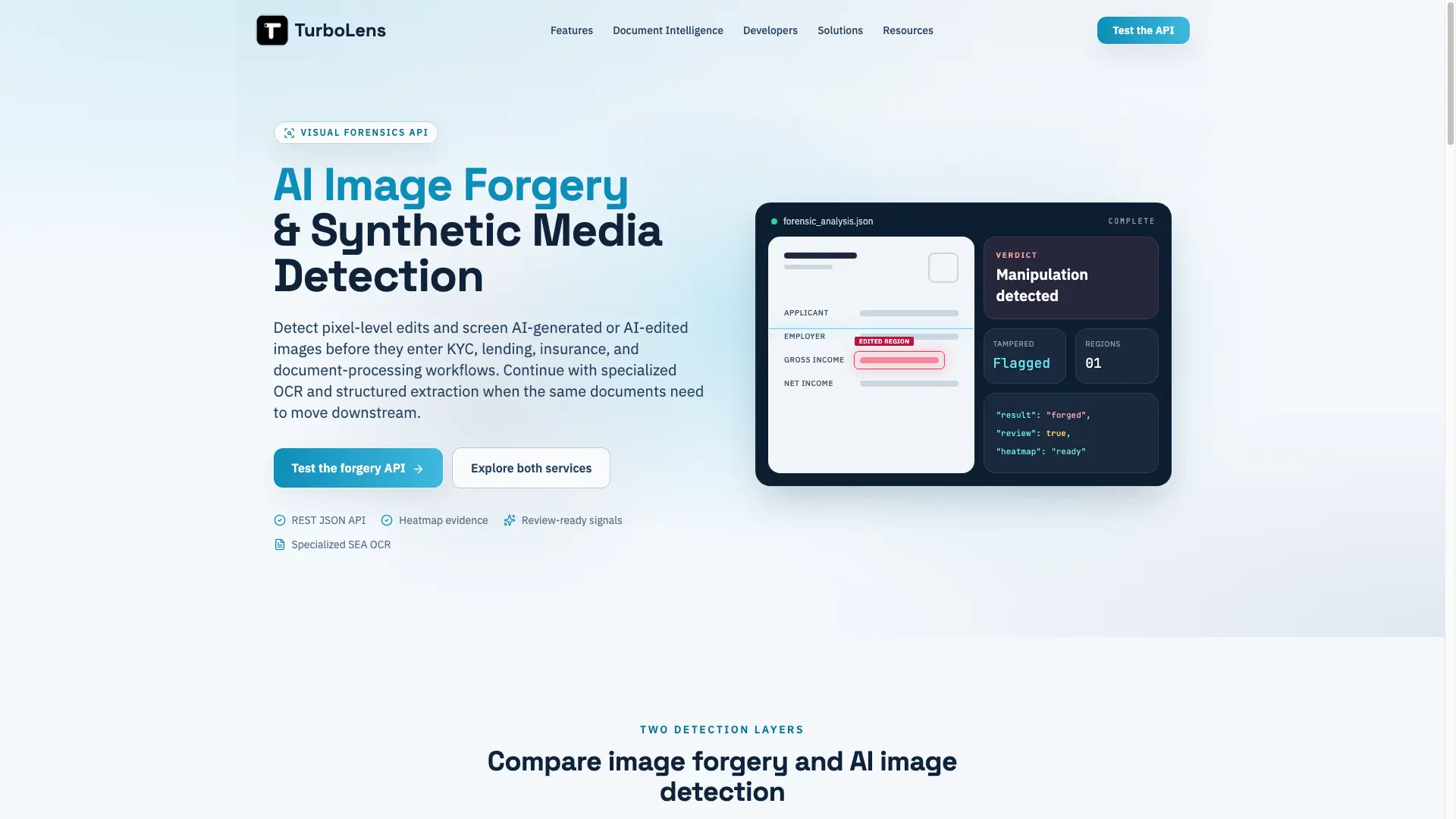
TurboLens is a visual forensics API that detects pixel-level image forgery and screens AI-generated or AI-edited images. It returns a real-or-forged verdict, tampered-pixel proportion, suspicious-region coordinates, and a heatmap, then routes clean files to OCR and downstream processing. A separate synthetic-media layer flags generative edits with a three-state result and probability score. Built for KYC, lending, insurance, and document-processing workflows.
TurboLens screenshot 1

How to use TurboLens?

1. Submit a document page or image to the API before OCR and downstream processing. 2. Analyze pixel-level forgery and, when enabled, synthetic-media screening. 3. Route clean files automatically and send flagged results to your review workflow.

TurboLens Core Features

01

Image Forgery Detection

Find evidence of local manipulation in an existing image. TurboLens analyzes pixel structure for splicing, copy-move edits, retouching, and altered fields.

02

AI-Generated & AI-Edited Detection

Screen images for synthetic origin or generative edits, including fully AI-generated documents and images modified with AI editing tools.

03

Review-Ready Heatmaps

Visual heatmaps highlight suspected edit regions so reviewers can see where an alteration may have occurred before manual review.

04

Structured JSON API

A single REST JSON endpoint returns verdict, tampered-pixel proportion, region coordinates, and routing signals your pipeline can act on.

05

Document Intelligence & OCR

Classify documents, extract structured fields, and process complex Southeast Asian layouts and scripts through API-first workflows.

06

Configurable Review Routing

Set your own thresholds and decide whether a flagged image is rejected, escalated, or queued for human review.

TurboLens Use Cases

KYC & onboarding: screen passports, national IDs, and licences for photo swaps, edited fields, and synthetic creation before account creation.

Lending: flag manipulated payslips, bank statements, and tax forms before a credit decision.

Insurance: check receipts, invoices, and claim photos for local tampering or generative edits before payout review.

Document processing: run authenticity checks before OCR, extraction, and approval so clean submissions continue automatically.

TurboLens Frequently Asked Questions

What is image forgery detection?

Image forgery detection analyzes an existing image for evidence of local manipulation, such as splicing, copy-move edits, retouching, or altered fields. TurboLens returns a real-or-forged verdict, the proportion of suspicious pixels, region coordinates, and a heatmap that helps reviewers see where an edit may have occurred.

How is AI-generated image detection different from forgery detection?

Forgery detection looks for edits made to an existing image, while AI-generated image detection estimates whether generative AI created or modified the image. These are separate forensic questions, so TurboLens treats them as two complementary screening layers rather than one interchangeable score.

Can TurboLens detect AI-edited images as well as fully generated images?

The synthetic-media service is being developed to screen both fully AI-generated images and images changed with generative editing tools. It is currently offered as early access, with a three-state result and probability score designed to support, not replace, human review and business rules.

Where does visual forgery detection fit in a document workflow?

Most teams place visual forensics immediately after upload and before OCR, extraction, or approval. Clean submissions continue through the existing pipeline. Flagged images can be rejected, escalated, or sent to a manual-review queue according to the organization's own thresholds and risk policy.

TurboLens Product Background & Official Links

TurboLens Support Email & Customer service contact & Refund contact etc.

TurboLens Support Email: support@turbolens.io

More Contact, visit the about us page(https://www.turbolens.io/developers)

TurboLens Pricing & Plans

Free

Free
Free
  • Try DocumentLens at no cost
  • Image forgery detection (production ready)
  • REST JSON API access
Subscribe & upgrade now

Enterprise

contact
Contact sales
  • Dedicated support
  • Custom integrations
  • Enterprise volume pricing
Subscribe & upgrade now

TurboLens Tags

API AvailableCloud-basedFreeFor DevelopersFor EnterpriseBulk ProcessingReal-time

Best Suited Occupations for TurboLens

Software DevelopersIT Ops & SecurityFinance & AccountantsLegal & Compliance

Top Product Categories

LLMs & AI Agents

  • AI Chatbots
  • AI Agents
  • Prompt Engineering
  • AI Search Engine

Engineering & Code

  • AI Code Assistant
  • AI Code Generator
  • AI Developer Tools
  • No-Code & Low-Code

Image & Creative

  • AI Image Generator
  • AI Design Generator
  • AI Art Generator
  • Image-to-Image

Video & Animation

  • AI Video Generator
  • AI Short Video Maker
  • Digital Humans
  • AI Video Editor

Productivity & Office

  • AI Meeting Assistant
  • AI PDF Tools
  • AI Workflow
  • AI PPT Generator

Marketing & Sales

  • AI SEO Tools
  • AI Copywriting
  • AI Lead Generation
  • AI Sales Assistant

Audio & Voice

  • AI Voice Cloning
  • AI Text-to-Speech
  • AI Music Generator
  • AI Podcast Tools

Research & Data

  • AI Research Tools
  • AI Data Analytics
  • AI Knowledge Base
  • See All Categories >>
BAT AI TOOLS
  • Submit your AI tool
  • Pricing
  • Partnership
  • Feedback
  • About
  • A2A Compatible
WeChat QR
Scan QR code with WeChat
hi@bataitools.comClick icon to auto-copy email
English简体中文繁體中文EspañolالعربيةBahasa IndonesiaPortuguêsFrançais日本語РусскийDeutsch한국어TürkçeTiếng ViệtItalianoNederlandsPolskiไทยहिन्दीУкраїнськаفارسیবাংলাاردوSvenskaNorskDanskSuomiעברית

Copyright © 1970 BAT AI TOOLS. All Rights Reserved.

·Partnership·Privacy Policy·Terms of Service·Refund Policy